OpenClaw demos look incredible. Set up an agent on a Saturday, connect it to WhatsApp, and suddenly it’s managing your calendar and drafting emails. Feels like the future.
Then Monday comes. The agent hallucinates a meeting. Sends an email to the wrong contact. Forgets what you told it yesterday. Gartner predicts 40% of enterprise apps will include task-specific AI agents by the end of 2026, but also warns over 40% of agentic AI projects may be canceled by 2027 due to unclear ROI and inadequate controls.
The gap between “it works on my machine” and “it runs our business” is where most OpenClaw use cases die. This article covers 7 use cases the community is actually building, and what it takes, architecturally, to move each one from demo to production. We’ve been building AI-powered systems for clients since 2015, and the patterns here come from the same pitfalls we help teams avoid across LLM frameworks and agent architectures.
Why Most OpenClaw Projects Fail After the Demo
The problem is assuming a prototype equals a product.
A demo runs on one machine, for one user, with curated inputs. Production means concurrent sessions, unpredictable queries, real integrations, and edge cases the demo never tested. McKinsey data shows 62% of organizations are experimenting with AI agents, but only 23% have scaled even one use case. The reason: the agent works, the system around it doesn’t.
Here’s what typically breaks: session state disappears between conversations. Prompts that worked in testing produce garbage with real inputs. There’s no monitoring, so failures are silent. No fallback logic, so one bad API call crashes the workflow. And OpenClaw security gets ignored with credentials in plaintext and community skills installed without review.
At this stage, you’re no longer building a script, you start building a system.
7 Real OpenClaw Use Cases (What Works vs. What It Takes to Scale)
We organized these from most common to most complex. Each follows the same structure: what the demo does, what breaks in production, and what you actually need to build. For each use case, we break down what works out of the box, where it falls apart under real conditions, and what you need to build to make it stick.
AI Customer Support Agent
Connect OpenClaw to your docs, point it at WhatsApp or Slack, and it answers customer questions in 30 minutes. The most popular starting point, and actually the first one to collapse under real traffic.
In production, these agents tend to fail in predictable ways:
- Hallucinations – the agent invents policies that don’t exist, then defends them confidently.
- No escalation path when the bot gets stuck, so customers loop.
- Inconsistent tone across sessions, swinging from formal to casual mid-conversation.
- Zero connection to your ticketing system, meaning resolved issues aren’t tracked anywhere.
Making this production-ready starts with a RAG pipeline grounded in version-controlled documents, then API integrations with Zendesk or Intercom for ticket routing. You need human handoff triggered by confidence thresholds, tone guardrails baked into the system prompt, and monitoring that tracks resolution rates and hallucination flags.
Internal Knowledge Assistant
Your team asks the agent about company policies, onboarding steps, or product specs. It pulls answers from an internal knowledge base. Saves HR and ops teams hours every week, until someone gets outdated info and makes a decision based on it.
Real scenario: a new hire asks about the PTO policy. The agent confidently quotes last year’s version because nobody re-indexed the updated handbook. There’s no access control — an intern can ask about executive compensation. Documents scattered across Google Drive, Notion, and Confluence mean the agent only sees half the picture.
To make this reliable, you need:
- Automated indexing pipelines that re-crawl sources on a schedule.
- Role-based permissions so the agent respects who’s asking.
- Chunking strategies tuned to your document types.
- Source attribution in every response so employees can verify.
You’ll need custom TypeScript skills to connect your specific data sources and enforce access logic.
Sales Outreach Automation
OpenClaw researches leads, drafts personalized messages, and sends them through email or LinkedIn. One community member reported saving 10+ hours per week on social outreach alone. The demo is addictive until you look at what it’s actually sending.
The problem starts with personalization. “I noticed your company does X” repeated 500 times is a template with a variable. The CRM stays disconnected, so reps duplicate efforts. Without approval workflows, the agent sends messages that violate compliance before anyone reviews them.
Production means CRM integration with HubSpot or Salesforce for deduplication and pipeline tracking. Enrichment APIs for firmographic data. Approval gates where a human reviews outbound before send. OpenClaw for business means building these layers, where the agent is the brain, but the integrations are the nervous system.
Data Extraction and Enrichment Pipelines
Point the agent at websites, PDFs, or APIs. It scrapes, structures, and returns clean data. Great for market research, competitive analysis, and lead generation, in small batches.
Scale it up and things get ugly. Formats vary across sources. API rate limits kill long-running jobs. A single failed extraction corrupts the batch. Token consumption spikes, one chain can trigger 5–10 API calls per item, turning a “cheap automation” into an expensive surprise at the end.
The production pipeline needs:
- Retry logic with exponential backoff for flaky sources.
- Validation layers that reject malformed outputs before they hit your database.
- Batch processing with checkpoints so failures don’t lose progress.
- Cost monitoring per pipeline run.
This is OpenClaw automation at its most useful, but also where engineering discipline matters most.
Personal Productivity Agent
This is the flagship personal AI assistant open source experience, and the reason OpenClaw hit 240,000+ GitHub stars. Manage your calendar, summarize emails, track habits, control smart home devices, all from Telegram or WhatsApp.
The cracks show within a week. The agent forgets yesterday’s conversation because context doesn’t persist cleanly. Old instructions crowd out new ones as the markdown memory grows. And permission boundaries barely exist — the agent treats “read my calendar” and “delete my calendar” as the same level of access.
For daily business use, you need calendar and email integrations with proper OAuth scopes. Persistent memory with priority ranking, not a flat markdown file. Permission boundaries in SOUL.md with hard limits on destructive actions. OpenClaw setup for personal tinkering takes an afternoon. Making it reliable for your workday takes architecture.
AI QA and Testing Agent
The agent reviews code, detects bugs, runs test suites, and reports results. Some teams generate test cases from user stories or monitor staging environments around the clock. It’s promising only until you realize the agent is grading its own homework.
Three failure modes show up consistently:
- The agent “passes” tests that should fail because its assertions are probabilistic, not deterministic.
- Results live in a chat window instead of your CI/CD pipeline, so nobody acts on them.
- Flaky outputs erode trust fast — the team stops checking after the third false positive.
Production means integrating with GitHub Actions, Jenkins, or GitLab CI so results feed into your pipeline. Pair LLM-generated assertions with deterministic checks. Add structured logging and artifact storage. The agent flags candidates; humans make the call.
Multi-Step Workflow Automation
Think Zapier, but conversational and AI-powered. A typical setup: “When a new lead comes in, enrich it, score it, assign it to a rep, draft a first email, and log everything in the CRM.” Five steps, three tools, one agent orchestrating all of it.
It’s also the most brittle use case. One step fails — say the enrichment API times out — and everything downstream breaks silently. The agent retries indefinitely or gives up at the wrong point. No state tracking means you can’t tell which step succeeded. Re-running the chain duplicates what already worked.
Production-grade orchestration needs:
- State tracking per workflow step, so you know exactly where a run stopped.
- Error handling with fallback branches, not just retries.
- Logging at every step for debugging.
- Idempotency so re-running a failed step doesn’t duplicate actions.
This is how to use OpenClaw for real business process automation, and the use case that most clearly demands OpenClaw custom development.
What Changes When You Move from Demo to Production
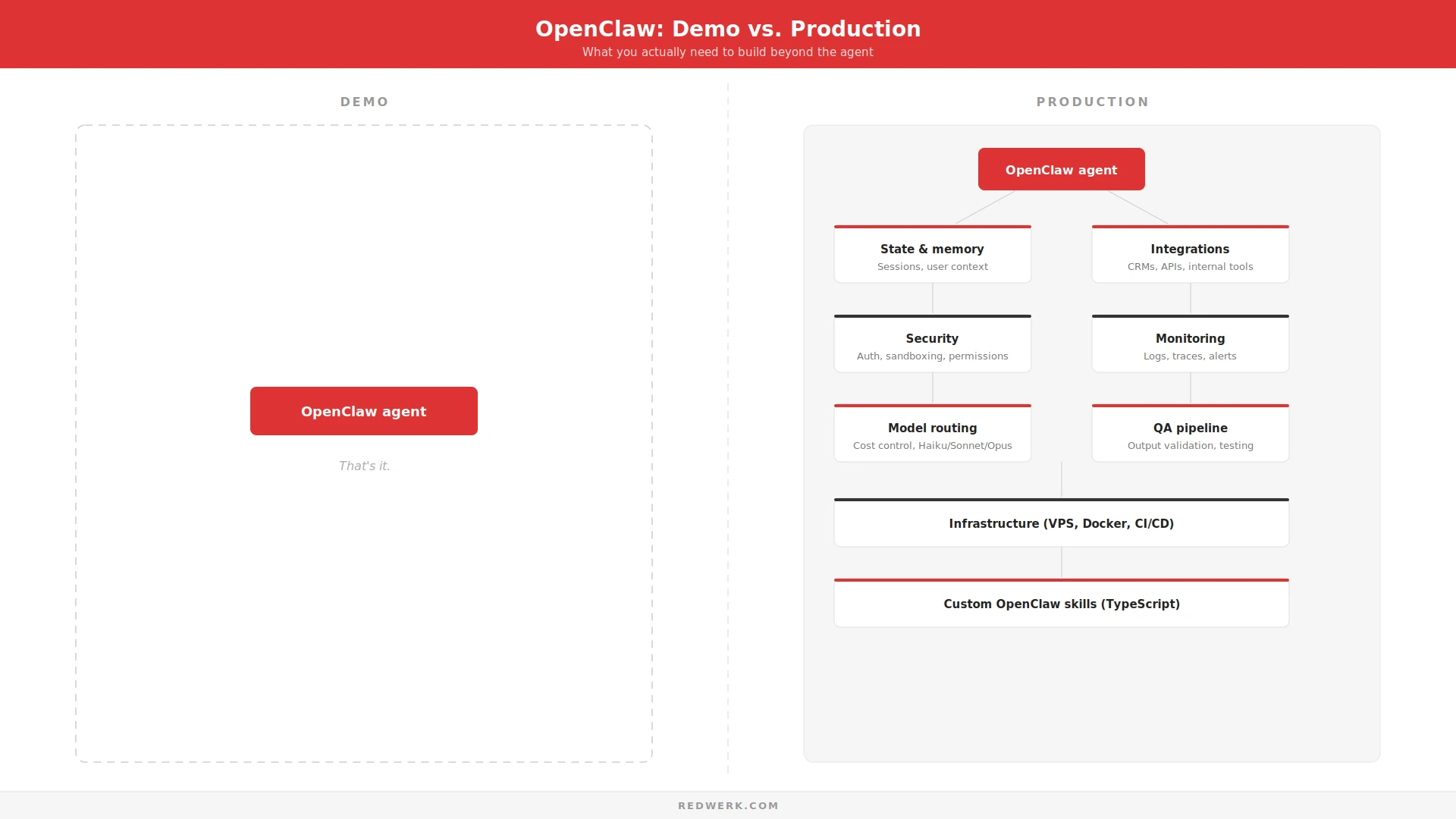
Scaling OpenClaw is all about architecture. Here’s what shifts.
Architecture Decisions
A monolithic agent handling everything is a demo pattern. Production splits responsibilities across modular agents — one for retrieval, one for action execution, one for user interaction. This mirrors what we’ve seen scaling AI systems without sacrificing quality.
State and Session Management
OpenClaw uses markdown-based memory. That works for personal use. For multi-user business systems, you need structured session storage, user context isolation, and memory pruning that keeps context windows manageable.
Model Routing and Cost Control
Not every task needs your most expensive model. Route simple classification to Haiku, complex reasoning to Sonnet, reserve Opus for high-stakes decisions. Community tools like ClawRouter reportedly cut costs ~70% through dynamic model selection.
Security and Compliance
CVE-2026-25253 scored CVSS 8.8 – a one-click RCE through WebSocket hijacking. Bitdefender found ~17% of ClawHub skills contained malicious code. OpenClaw deployment into production requires loopback binding, dedicated non-root users, Docker sandboxing, and code review for every third-party skill.
Observability and Monitoring
If you can’t see what your agent is doing, you can’t fix what it breaks. Production needs structured logging, trace capture for multi-step workflows, alerting on error rates, and cost dashboards.
When OpenClaw Stops Being “Free”
OpenClaw is MIT-licensed. The framework costs nothing. The engineering to make it production-ready is a different story.
API costs scale with usage, as one heavy session can burn 200K+ tokens from accumulated context. Infrastructure needs a VPS running 24/7. Custom skills require TypeScript development. Integrations with your CRM and internal APIs need building, testing, and maintaining. As AI reshapes software maintenance, the ongoing cost of keeping an agent system healthy only grows.
The cost doesn’t sit in running OpenClaw, but in making it reliable.
How Teams Turn OpenClaw Prototypes into Real Products
The teams that move from demo to production follow a consistent pattern. They define scope. They build custom OpenClaw skills in TypeScript for their specific integrations. They invest in infrastructure: VPS, Docker containers, monitoring. They design QA pipelines that validate agent outputs before they reach users.
We followed a similar approach building AI-powered systems for Evolv, where the challenge was making AI recommendations production-ready with strict quality controls and real user data. The principle is the same with OpenClaw: the agent is the starting point, not the finished product.
If your OpenClaw setup works in a demo but not in production, you’re exactly at the stage where engineering support makes the difference. Whether it’s custom skill development, system integrations, or digital transformation at a larger scale — that’s what we do.
Cool Demo. Now What?
OpenClaw is powerful. It’s also not plug-and-play.
Making these 7 use cases work in production requires architecture, integrations, security hardening, and monitoring. That’s the reality of every AI agent system in the years to come.
The difference between a demo and a product is everything around the agent. The RAG pipeline. The permission model. The error handling. The observability layer.
Start with one use case. Build it right. Then scale. And if you need a team that’s done this before — contact us. We’ll take it from demo to done.
FAQ
What are the most common OpenClaw use cases for business?
Customer support agents, internal knowledge assistants, sales outreach, and multi-step workflow orchestration are the four AI agent use cases with the widest adoption. Most teams start with email or calendar automation.
Is OpenClaw safe to use in production?
Not out of the box. It requires loopback binding, dedicated users, Docker sandboxing, and skill code reviews. CVE-2026-25253 showed that default configs expose serious attack surface.
How much does it cost to run OpenClaw?
The framework is free. API costs depend on model and volume per million tokens. Add VPS hosting plus engineering time for custom skills.
Can OpenClaw replace Zapier or Make?
For multi-step workflows, OpenClaw can replicate and extend what Zapier does—with AI reasoning between steps. The trade-off: it requires engineering, while Zapier is no-code. Teams with custom needs often find OpenClaw AI more flexible.
Do I need a development team to use OpenClaw in production?
For personal productivity, no. For business-critical systems with integrations, compliance, and multiple users, yes. The prototype is a solo project; the product is a team effort.
See how we helped an AI experimentation platform handle complex workflows and scale reliably in production.