If you are a Founder, a Product Manager, or a CTO, the thought of launching digital products faster lives rent-free in your mind. What if there were an AI for UX design that could turn your back-of-the-napkin ideas into clickable, beautiful prototypes in minutes?
On March 19, 2026, Google caused a major shake-up in UI design. The Google Stitch AI design tool — originally a modest text-to-UI experiment from Google Labs — received a massive overhaul that sent Figma’s stock tumbling 8% in a single day.
But is this AI tool the holy grail for teams lacking UX/UI resources, or is it just another shiny toy that will break when you try to scale? Let’s dive deep into the world of vibe design, explore how Google Stitch actually works, and figure out when it’s time to call in the human experts.
What on Earth Is Vibe Design?
You’ve probably heard the term “vibe coding.” Popularized by AI researchers in early 2025, vibe coding is the practice of describing what you want a piece of software to do (the vibe of the app) and letting an AI agent write the code.
Now, this concept has evolved into vibe design. Instead of dragging and dropping rectangles in a design tool for hours, you simply use natural language to describe the mood, layout, and function of an interface. It is an intent-driven approach to AI UX design. According to Figma’s State of the Designer 2026 report, 91% of designers say AI tools improve their designs.
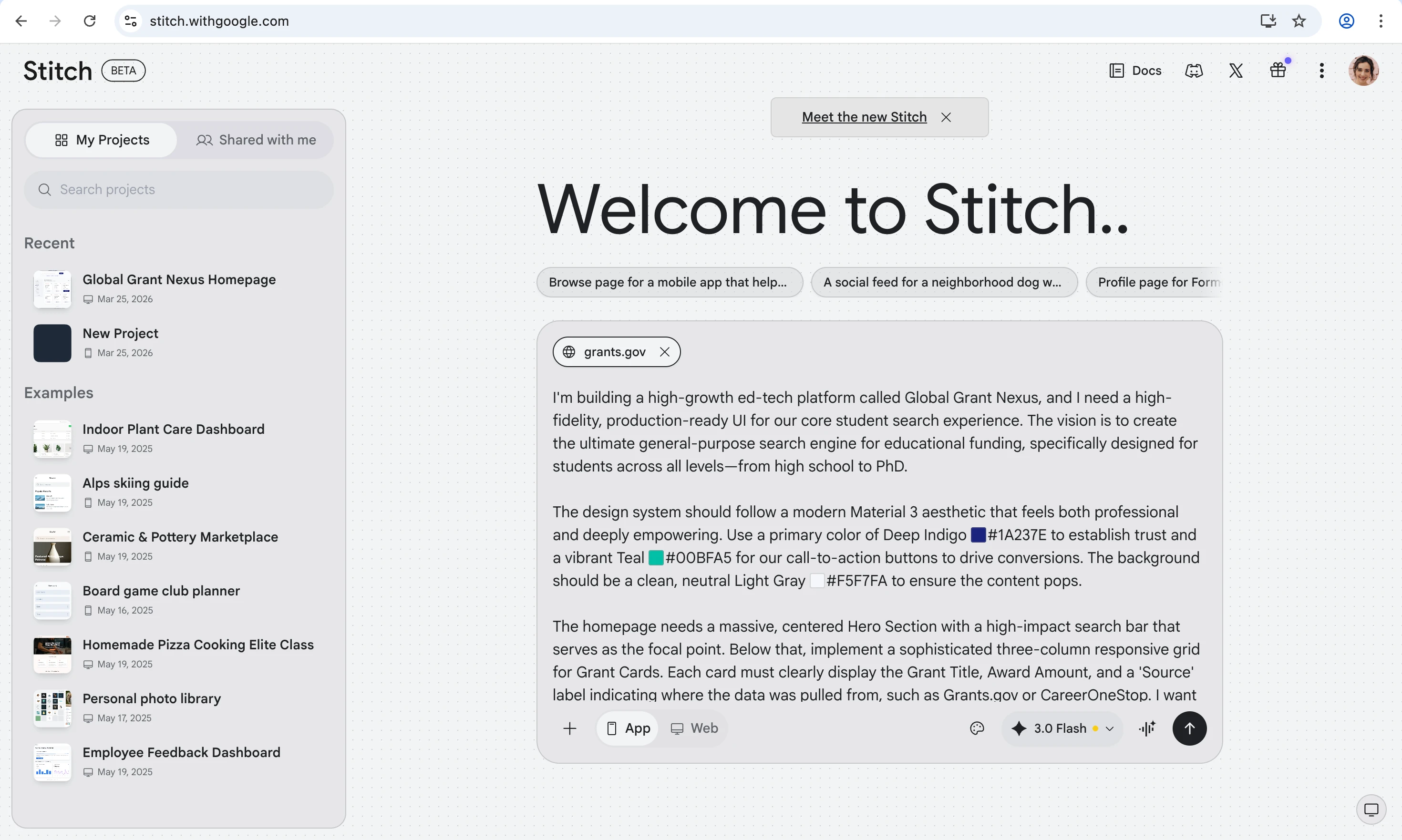
In a vibe design system, you’re optimizing for finding the right feel quickly, before spending time polishing details. You tell the vibe design AI that you need “a sleek, dark-mode SaaS dashboard with a sidebar, data visualization widgets, and a neon-green call-to-action button,” and it does the heavy lifting.
This represents a massive shift in vibe coding UX design, empowering non-designers to get their ideas onto a screen instantly. You can see how this trend is shaping the industry by looking at some of the top vibe-coded apps hitting the market.
The Evolution of Google Stitch AI
So, what is Google Stitch? The platform didn’t just appear out of thin air. Introduced in May 2025 as a humble Google Labs experiment, it initially ran on standard Gemini models to help developers quickly spin up front-end code from text prompts. It was neat, but it was basic.
Fast forward to the massive March 2026 update, and Stitch has transformed into a beast. At its core, it’s an AI-powered UI design platform from Google Labs that generates high-fidelity interfaces from text prompts, images, or voice commands. You describe your app or website, and Stitch builds it — complete with clean HTML, CSS, and Tailwind code you can actually use.
The platform runs on Google’s Gemini AI models and remains free, offering 350 generations per month in Standard Mode and 50 per month in Experimental Mode.
Core Features of the Google Stitch UI Design Tool
According to tech reports, the introduction of this advanced Google Stitch design tool caused a noticeable ripple in the design software market. It’s clear that it is now a serious contender in the rapid prototyping space. Here’s what’s new.
AI-Native Infinite Canvas
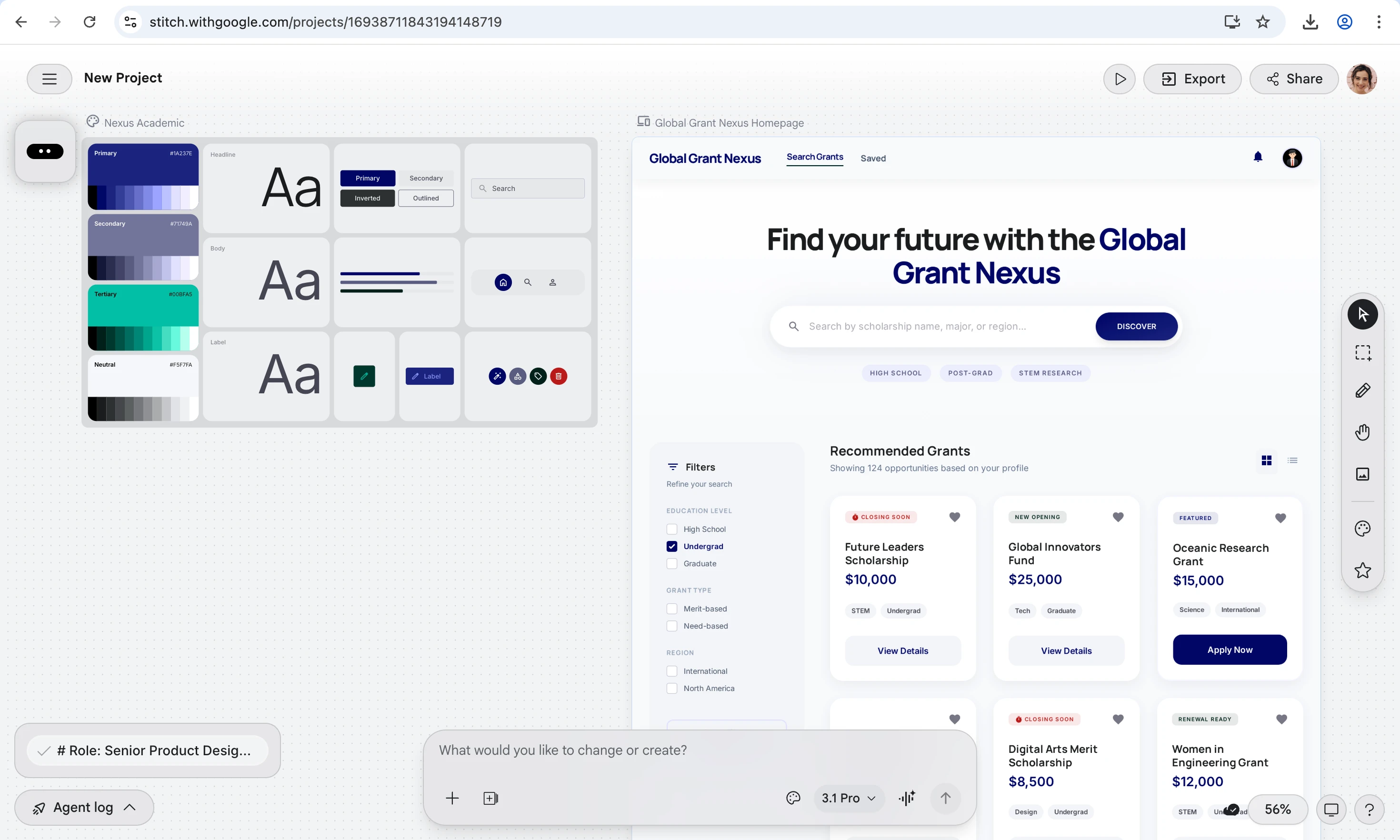
The redesigned canvas accepts images, text, and code within a single workspace. Drag in a competitor’s screenshot or drop in a product requirements doc, and Google Stitch UI will use it all as reference material. The new canvas generates up to five screens simultaneously, compared to just one before.
Design Agent
A new AI agent tracks your full project history and reasons across everything you’ve built. It offers critiques, generates variations, and helps explore multiple directions at once. However, like any junior designer, its suggestions need a human eye.
Voice-Driven Design
You can now speak directly to the canvas. Say “show me this in a dark theme” or “give me three different menu layouts,” and the Google Stitch app responds in real time. It’s particularly handy during early brainstorming when typing precise prompts feels too slow.
Instant Prototypes
Static designs become clickable flows with one click. You “stitch” screens together and hit “Play” to preview the user journey. The tool can even auto-generate logical next screens based on button clicks. This is where vibe coding UX design meets practical prototyping. For teams that value early user involvement in software development, this fast feedback loop is a game-changer.
DESIGN.md and Design Systems
DESIGN.md is an agent-friendly markdown file that captures your design rules in a portable format. You can extract a vibe design system from any URL or import/export design rules across tools. The Google Stitch design tool also integrates with coding assistants like Claude Code and Cursor through an SDK and MCP server, bridging vibe coding design system concepts with developer workflows.
One-Click Export and Developer Handoff
Every design generates clean HTML, CSS, and Tailwind code. Stitch with Google also supports one-click export to Figma with editable layers and Auto Layout. If you’re building on top of modern front-end design practices, this export flow plugs in nicely.
Who Benefits Most from Google Stitch AI?
Not every team will get the same value from the Google Stitch AI UI design tool. Here’s where it shines brightest:
- Solo Founders and Early-Stage Startups. If you’re a non-technical founder with a product idea and no designer on payroll, the Google Stitch AI tool for UI design removes a major bottleneck. Going from hiring a freelance designer ($2,000–$5,000 for a landing page) to a text prompt and 20 minutes.
- Product Managers and CTOs. Need to pitch three different UI concepts to stakeholders by Friday? AI for UX design like Stitch lets you generate multiple design directions in parallel. The Agent Manager keeps your explorations organized so you’re not drowning in tabs.
- Small Development Teams. Many dev shops run lean on design talent. This tool fills the gap during the ideation phase. For backend developers who shudder at the thought of CSS, this tool provides a structured, styled interface. It allows them to focus on the logic and architecture while the AI handles the aesthetic polish.
- Agencies Running Rapid Prototyping Sprints. The old workflow — brief, wireframes, design, review, handoff — could eat 3–4 days. With AI and UX design tools, a brief can go from concept to developer handoff the same morning.
Known Drawbacks and Limitations of Google Stitch
For all the hype, the Google Stitch AI design tool has real limitations that decision-makers should understand before building a workflow around it:
- No Design System Management. You can’t define and enforce a component library, design tokens, or brand guidelines across projects yet. The DESIGN.md feature is a step in the right direction, but it’s still rudimentary compared to a mature Figma setup.
- Single-User Only. There’s no real-time multiplayer editing or team workspaces. If your design process involves multiple designers iterating simultaneously, you’re out of luck.
- Inconsistent Accessibility Compliance. WCAG compliance is hit-or-miss and often needs manual review. That’s a dealbreaker for products in regulated industries or those targeting accessibility-conscious markets.
- Output Quality Depends on Prompt Quality. One vague sentence in, one generic design out. The tool rewards structured, specific prompts and punishes laziness.
- No Animation or Advanced Interaction Support. Micro-interactions, complex transitions, and custom animations are beyond what Google Stitch UI can handle. Those still require manual design work.
- Google Labs Experiment Status. This is crucial. Stitch has no announced pricing, no enterprise roadmap, and no long-term availability commitment. Google’s track record with experimental products (remember Google Wave? Stadia?) means building your entire workflow around it carries risk.
Is Google Stitch Production-Ready? The Honest Answer
Short answer: no. Longer answer: it depends on what you mean by “production.” The Google Stitch AI tool excels at the “zero-to-one phase”, which is getting from a blank page to a solid first draft fast. You can go from a vague product idea to a multi-screen clickable prototype faster than you could set up a new Figma file.
But the “one-to-hundred phase” — refining designs into accessible, brand-consistent, production-grade systems — is where it falls apart. It doesn’t capture the deeper aspects of design thinking: visual hierarchy, user journey mapping, emotional resonance, or the kind of strategic decisions that separate a good product from a great one.
One experienced designer who tested the update summarized it well: the output was fast, the editing was clunky, and the quality landed somewhere between “fine for a prototype” and “I wouldn’t show this to a client.” Speaking of AI-generated apps that go to market, many require extensive vibe code cleanup before they can truly be called production-ready.
The practical workflow for most teams in 2026: explore in Google Stitch, refine in Figma, build with a professional development team.
When to Involve Professional UI/UX Designers and Business Analysts
Here’s where AI for UX design ends and human expertise begins:
1. User Research and Problem Definition
No AI tool can interview your target users, synthesize pain points, or define what the product should actually do. A business analyst validates that you’re solving the right problem before a single pixel is generated.
2. Information Architecture and User Flows
Stitch can generate individual screens, but it doesn’t understand how users actually navigate complex products. Professional UX designers map out journeys and design for edge cases that AI simply ignores.
3. Brand Consistency and Design Systems
Because LLMs are trained on existing data, they tend to regress to the mean. If your product needs to look and feel like your brand, not like a generic AI output, you need a designer who understands your visual language. Investing in professional UI/UX design services pays off in the long run.
4. Accessibility and Edge Cases
According to the World Health Organization, over 1 billion people live with some form of disability. Designing for accessibility (WCAG compliance) is non-negotiable for modern web development. While vibe design creates visually pleasing interfaces, it often ignores complex state changes, error handling, screen reader compatibility, and extreme edge cases.
5. Security and Architecture Risks
When you export code from an AI tool, you inherit whatever assumptions the AI made. Integrating AI-generated front-end code without a thorough review can lead to vulnerabilities. This is why human oversight and AI augmented development security protocols are absolutely vital before anything goes live.
From Vibe to Viable with Redwerk
Google Stitch AI can get you from zero to prototype in minutes. But getting from prototype to a product that users love, investors trust, and the market rewards? That’s where experience matters.
Redwerk is a software development agency with 20+ years of experience building digital products for startups, mid-sized businesses, and enterprises across North America, Europe, Australia, and New Zealand. We specialize in turning early-stage concepts into polished, scalable products, which is exactly where MVP development becomes critical. Here’s what that looks like in practice.
Taskly, an on-demand services marketplace from Sydney, came to Redwerk with outdated designs as they prepared to launch in the UAE. Our UX/UI team performed a comprehensive audit, identified accessibility issues and poor visual hierarchy, and delivered a complete app redesign for Taskly that positioned the product for success in a competitive new market.
Tingl, an anonymous blockchain messaging app, was conceptualized and developed from scratch by Redwerk. From market research through UI/UX design to building a custom transport protocol for maximum privacy, this project showcases what happens when design thinking and engineering work hand in hand from day one.
These projects required strategic thinking, user research, and engineering depth. What Google Stitch AI can do is accelerate the ideation phase, and that’s genuinely valuable. But when it’s time to turn those ideas into a product that works at scale, you need a team that’s been there before.
Ready to Turn Your AI Prototype into a Real Product?
Tools like the Google Stitch AI make it easier than ever to go from idea to mockup. But turning that mockup into a polished, scalable, market-ready product? That’s where Redwerk comes in.
Whether you need professional UI/UX design, MVP development, or a full-stack engineering team to take your prototype to launch — we’ve helped 170+ businesses build products from the ground up.
Got a prototype that needs the professional touch? Contact Redwerk and let’s make it real. We’re two clicks away.
Frequently Asked Questions
What is Google Stitch?
Google Stitch is an AI-powered UI design tool from Google Labs that generates high-fidelity user interfaces from text prompts, images, or voice commands. It runs on Google’s Gemini models, exports clean HTML/CSS code and Figma-compatible files, and is currently free to use with a Google account. The tool launched at Google I/O 2025 and received a major update in March 2026 introducing an infinite canvas, design agent, voice interaction, and instant prototyping.
Is Google Stitch free?
Yes, as of March 2026, Google Stitch is completely free through Google Labs. Users get 350 generations per month in Standard Mode and 50 per month in Experimental Mode. All you need is a Google account. However, Google hasn’t committed to long-term pricing or availability, so this could change.
What is vibe design?
Vibe design is a creative workflow where you describe your design intent in natural language — or through images, sketches, and voice — and AI generates the UI. Instead of manually placing elements and adjusting pixels, you communicate what you want the product to look and feel like, and the AI handles production. The term was popularized by Google with its March 2026 Stitch update and builds on the “vibe coding” concept coined by Andrej Karpathy.
How to use AI for the UX design process?
Start by using AI for UX design tools like Google Stitch for rapid ideation and prototype generation. Feed the tool detailed prompts describing your target audience, business objectives, and desired user experience. Use AI-generated outputs as conversation starters with stakeholders, not as final deliverables. Then bring in professional UX designers for user research, accessibility auditing, and brand refinement. The most effective workflow in 2026 treats AI UX design tools as accelerators for exploration and human designers as the quality gate for everything that ships.
Can Google Stitch replace a professional UI/UX designer?
Not yet. The Google Stitch AI design tool is excellent for generating initial concepts and clickable prototypes fast. But it doesn’t replace design thinking: user research, accessibility compliance, brand expression, and edge case handling still require human expertise. Think of Stitch as a powerful first step, not the entire journey.
See how we performed a major UX/UI overhaul for Taskly, redesigning 130+ screens to enable their successful UAE market entry