Between 55% and 75% of Enterprise Resource Planning (ERP) implementations fail to meet their original objectives. That number has barely moved in a decade, despite every vendor promising that legacy ERP modernization has never been easier.
Based on our experience, the real question is not whether to modernize. It is how to do it without betting the business on a single cutover weekend. The good news is that there is a proven engineering approach for exactly that. We’ve shared it with our clients through software development consulting, and today we’ll explain it here to help ensure that when you reach the point of modernization, you know exactly how to minimize risks.
Your board is not wrong to be worried about the challenges of modernization or even ERP cloud migration. What they may be wrong about is where their worry is pointing them. Doing nothing is not the safe option. A legacy ERP that is fifteen years old is quietly compounding a different kind of damage every quarter: integration debt that grows with every new tool your team adopts, operational bottlenecks your competitors do not have, and a shrinking pool of developers who can even read the code holding the system together. According to Gartner, about 40% of infrastructure systems carry unresolved technical debt, consuming budget that cannot go toward growth, innovation, or staying competitive.
If you want to avoid that deadly trap, read on about how to make your ERP modernization plan not only effective but also safe.
Why the Rip-and-Replace ERP Pitch Keeps Winning (and Keeps Failing)
Before getting to the solution we recommend, it is worth understanding why the dominant advice in the market remains wrong.
Large system integrators (SIs), such as Deloitte and Accenture, and their SAP and Oracle implementation partners make money on scope. However, a carefully phased, module-by-module extraction does not generate a multi-million-dollar statement of work. Instead, they get revenue from full platform replacement. Therefore, the incentive structure of the ERP consulting market is fundamentally misaligned with your risk profile as an operations-heavy mid-market business.
The generic content dominating search results is no better. Articles titled ‘five steps to modernize your ERP’ or ‘ten signs you need a new system’ are written for clicks, not for a COO managing $150 million in annual revenue who needs to know what actually happens at go-live. They name the approaches (rehost, refactor, replace), but they do not explain how to do any of them safely while orders are still shipping.
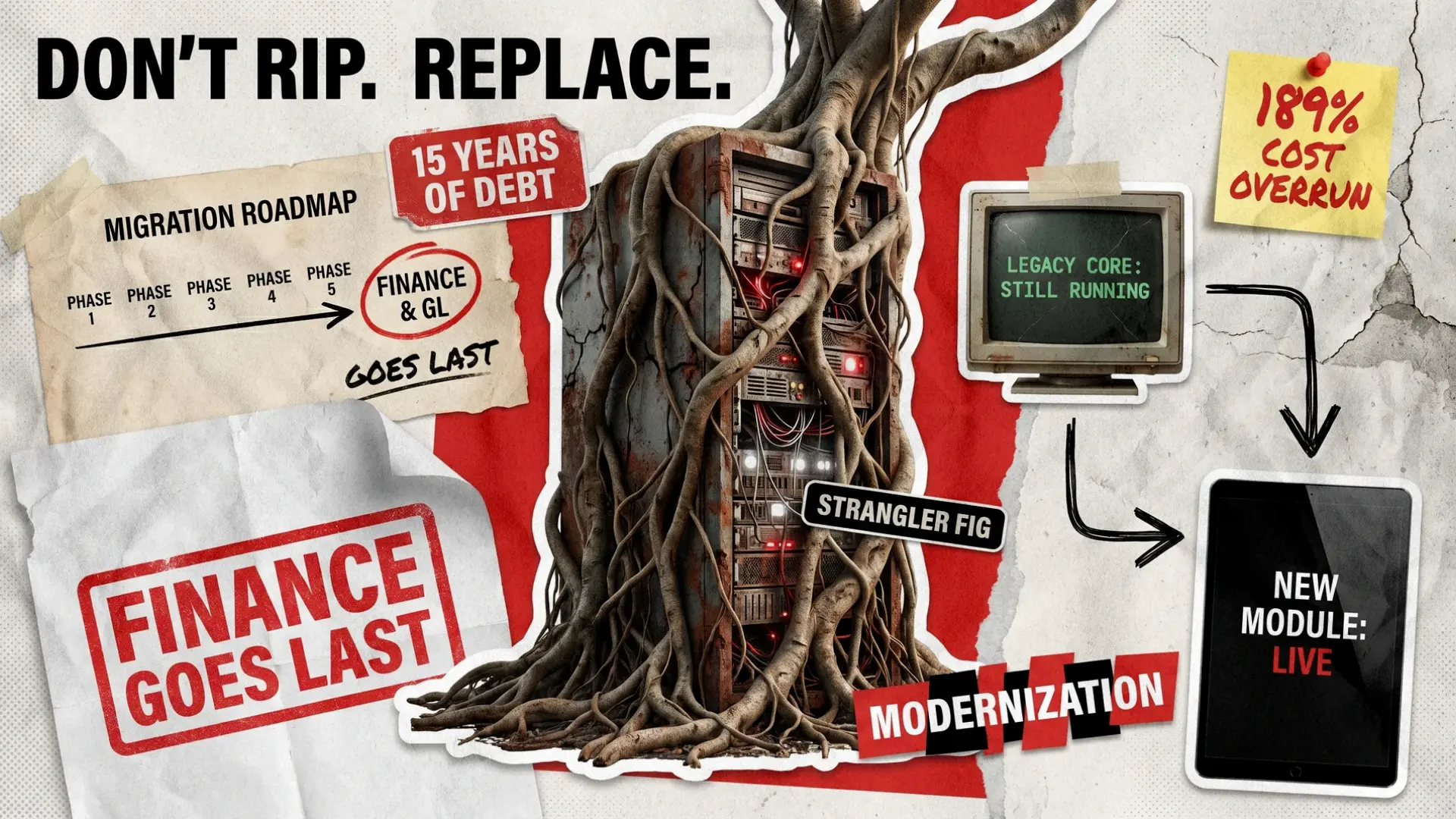
When your ERP is 15+ years old and tightly coupled across finance, inventory, procurement, and fulfillment, a big-bang replacement means trying to simultaneously replicate poorly documented behavior, introduce architectural changes, and deliver new features, all while producing zero business value for months or years. According to 2025 research citing Panorama Consulting data, organizations report average cost overruns of 189% across all industries on big-bang ERP projects. That is the industry average for organizations that take the big-bang path.
Meanwhile, the specific fears keeping COOs and CTOs up at night never make it into generic guides. Are the following questions relevant to you?
- What do you do when your ERP core is written in a language nobody on your current team can read?
- How do you migrate fifteen years of financial data without breaking your audit trail?
- Which modules do you touch first, and which do you protect until the very end?
- How do you run parallel systems for inventory without accidentally shipping the same order twice?
We’ll answer all those ERP modernization questions below.
What Is the Strangler Fig Pattern in Legacy ERP Modernization?
Here’s a quick, but crucially important, history lesson. In 2004, software architect Martin Fowler described a pattern for modernizing legacy applications without the catastrophic risk of a full rewrite. He called it the Strangler Fig pattern, named after the tropical tree that grows around a host, gradually absorbs its role, and eventually replaces it without cutting it down first. It’s a perfect metaphor, and also a genuinely useful software strategy.
In practice, the idea is simple: instead of building a new system from scratch and switching over on a fixed deadline, you place a routing layer in front of the legacy system and extract functionality one piece at a time. This way, the old system keeps running while new modules are built and tested alongside it. Traffic is redirected gradually, so when the last module has been extracted and confirmed stable, the legacy core is decommissioned. It happens not because you flipped a switch, but because it no longer has a job to do.
This pattern was developed for web applications, but it maps almost perfectly to ERP modernization and is the framework Redwerk applies to every legacy system modernization engagement.
The Strangler Fig approach works where big-bang replacement consistently fails for four practical reasons:
- The legacy core keeps running throughout the project, which means that orders ship, invoices go out, and payroll processes. There is no cutover weekend where everything has to go right at once.
- Each module extraction is a bounded, testable risk: if the new warehouse management module has a bug, it affects warehouse operations, not your entire finance, procurement, and manufacturing stack simultaneously.
- You learn before you commit, so the first few module extractions reveal things about your actual data that no discovery phase could surface, and those discoveries shape everything that follows.
- The business builds confidence incrementally, and by the time you reach the finance modules, your team has already done this successfully several times over.
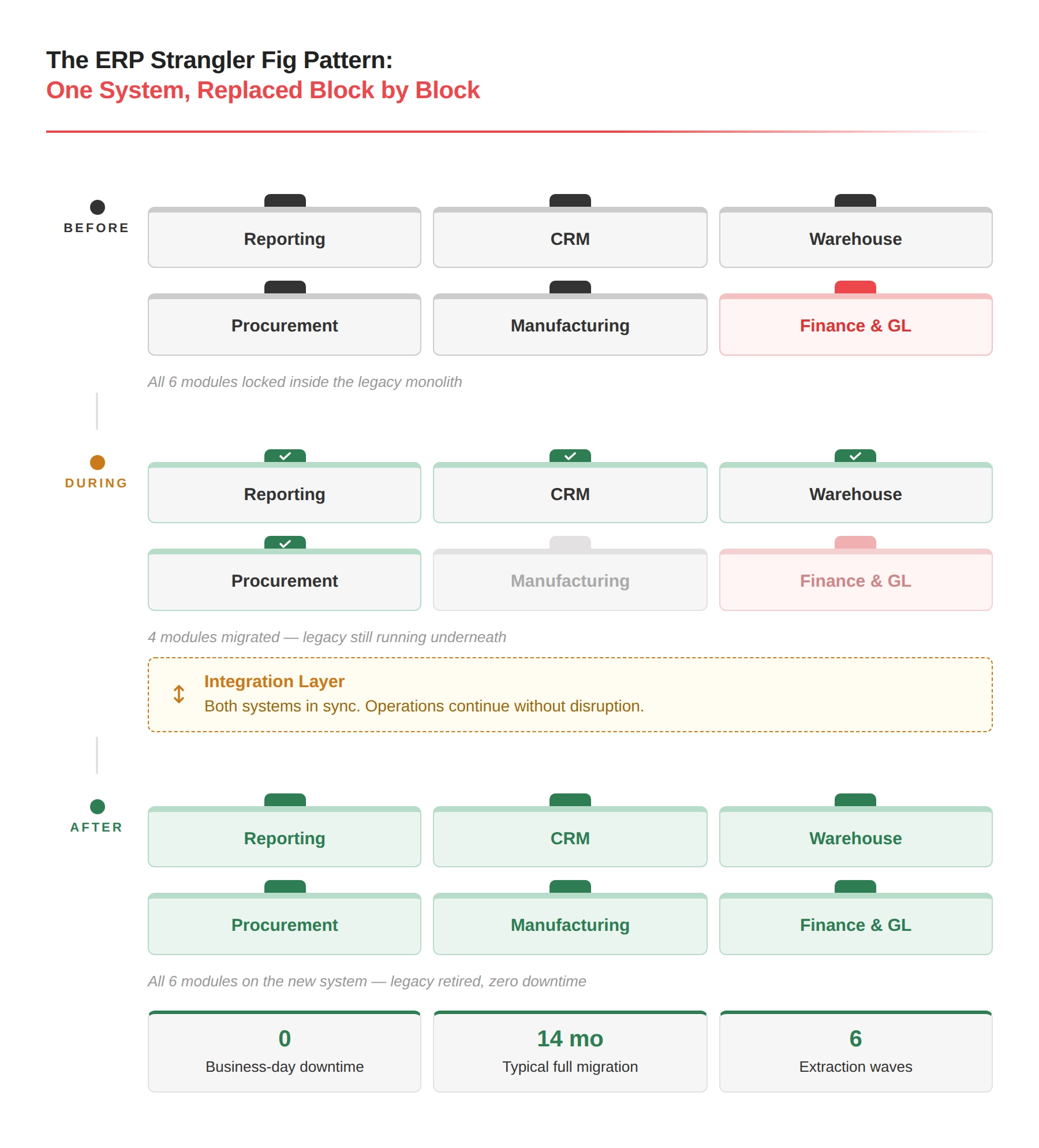
ERP Migration Strategy and Module Extraction Order to Minimize Risks
Not all ERP modules carry equal risk, so the sequence in which you extract them is not a project management question. It is the entire ERP modernization risk management strategy.
The governing principle here is to extract modules in the inverse order of business criticality and audit sensitivity. Start with what is painful but survivable if something goes wrong. End with what carries regulatory, financial, or customer-facing consequences.
Here is the wave sequence Redwerk usually follows on legacy ERP modernization engagements.
Phase 1 (Months 1 to 2): Reporting and Analytics
This is where you start by building read replicas of your legacy ERP database and pointing the new reporting infrastructure at them. There are no writes to the legacy system in this phase, so there is no operational risk. Your team gets its first concrete win: modern dashboards, real-time data, the visibility that finance has been requesting for years, without touching a single live process. As a bonus, this wave almost always reveals that your actual data looks quite different from what the documentation says. Finding that out in month one rather than month twelve is worth a great deal.
Phase 2 (Months 2 to 4): Customer-Facing Integrations and CRM
Customer Relationship Management (CRM) portals, order status APIs (Application Programming Interfaces), and EDI (Electronic Data Interchange) connections to 3PL (third-party logistics) providers sit technically adjacent to the ERP core. They can be rebuilt with modern interfaces while still reading from and writing to the legacy system through an integration layer. If a customer portal has a bug, a customer has a frustrating experience. Operations continue without interruption, and your team builds the integration playbook it will use for every subsequent wave.
Phase 3 (Months 4 to 7): Warehouse and Inventory Management
This is where the real operational pain lives for manufacturing, distribution, and logistics businesses. Extract this module third, not first. You need the reporting infrastructure from the first phase to monitor the migration in real time, and the integration patterns from the second as your engineering foundation. The parallel migration tracks described in the next section are what make this wave survivable.
Phase 4 (Months 7 to 10): Procurement and Supplier Management
Procurement is tightly coupled to both inventory (purchase orders feed stock levels) and finance (purchase orders generate accounts payable). Extract it after inventory so the two new modules can communicate with each other natively, rather than both routing through a legacy intermediary.
Phase 5 (Months 8 to 12): Manufacturing Execution and Production Planning
This is typically the most complex extraction for manufacturing and distribution clients. Custom business logic embedded here often exists only in the institutional memory of people who have been at the company for a decade, and integrations to production equipment are rarely documented in any usable form. Overlap the later stages of this phase of ERP data migration with phase 4, where possible, but do not begin until inventory is stable.
Phase 6 (Months 11 to 14): Finance, Accounts Receivable and Payable, and General Ledger
Finance goes last, that’s the absolute rule. It’s not because it is the least important (it is the most important), but because by this point in the legacy ERP modernization process, your team has successfully executed this migration pattern five or six times already. The data migration tooling is battle-tested, and integration patterns are proven. Engineers understand your actual data at a depth that simply was not possible at project kickoff. That is when you touch the audit trail.
Poor data migration and inexperienced implementation teams are the top two causes of ERP migration strategy failure. Sequencing finance last directly addresses both: data quality processes have been running for nearly a year by the time you migrate the general ledger, and the team executing the work has done it repeatedly before touching the records auditors care about.
How to Do a COBOL or Legacy Core ERP Modernization Not Touching the Code
Here is a scenario that comes up more often than you might expect in manufacturing and distribution: the core of your ERP was written in COBOL, RPG, or a proprietary 4GL (fourth-generation language) that nobody on your current team can read, and the vendor who built it went out of business years ago. The instinct is to treat this as proof that full replacement is unavoidable and that you need new custom ERP software to start from scratch.
However, applying the Strangler Fig pattern can save you from costly development with one additional ingredient: an API (Application Programming Interface) gateway placed in front of the legacy core. Think of it as giving your old system a modern front door without renovating what is behind it.
The process works in four steps:
- Mapping the Transaction Surface
You do not need to understand every line of code, but rather understand what inputs go in and what outputs come out. Database transaction logs and network packet capture provide this picture. In a typical legacy ERP, roughly 80% of the business-critical logic lives in 20% of the transaction types, and that is where you focus. - Building an Adapter Layer
A lightweight middleware service that translates modern REST (Representational State Transfer) or GraphQL calls into whatever format the legacy system accepts. That might mean database writes, flat-file imports, or interactions that simulate a user typing into the old interface. It’s not elegant, but deliberate and safe. - Shadow Writes
When a new module creates a transaction, it writes to the new database and simultaneously sends a copy to the legacy adapter. Both systems stay synchronized, so if the new system has a bug, the legacy system remains the source of truth, and you roll back cleanly. After 30 to 90 days of parallel running with consistently matching results, you flip the dependency: the new system becomes primary. - Retiring the Adapter Module by Module
Once the last system that depended on it has been extracted and validated, the adapter and the legacy core are safely decommissioned.
This approach to legacy ERP migration lets you modernize a COBOL system without writing, modifying, or even fully understanding a single line of this positively ancient language.
ERP Data Migration Best Practices: 3 Tracks That Must Run in Parallel
The most expensive mistake in ERP modernization projects is treating data migration as a task that happens before release. For operations-heavy businesses, three distinct migration tracks must run continuously from the first week of the project. Treat them as a single sprint before cutover, and you will not reach go-live without stopping operations.
Master Data Harmonization
If your legacy ERP has 15+ years of accumulated entropy, such as duplicate customer records, the same product under five different part numbers, suppliers entered four different ways, and unit-of-measure inconsistencies. These are invisible in the old system but immediately break things in a modern one.
Build automated data quality rules that run against your legacy data on a daily schedule from day one of the project. Each run produces a violations report, and your data team works through it progressively. By the time you need a final migration pass, the data is clean because it has been getting cleaner for twelve months.
Transaction History Migration
Your new system needs historical data to be useful from day one, including prior-year sales for forecasting, purchase order history for supplier performance analysis, and inventory movement history for cost accounting. The volumes involved, often hundreds of millions of rows for an operations-heavy business, make a single-weekend migration technically impossible.
The solution is to migrate continuously, in managed chunks, starting as early as possible. This way, by go-live, the historical migration will be 95% complete, and only the final weeks will require a tight synchronization window.
Open Transaction Cutover
Open purchase orders, sales orders, invoices, and work-in-progress production jobs represent the live operational state of your business right now. Therefore, these cannot be migrated incrementally. They must move during the cutover window with precision.
To minimize disruptions, perform the ERP data migration as follows:
- Freeze new transactions in the legacy system
- Export open records
- Validate every row against defined business rules
- Import into the new system
- Run parallel verification
- Open for business before the start of the next working day
The entire prior 12 months of preparation exist to make this 48-hour window as uneventful as possible. For a deeper walkthrough of how these tracks fit together, Redwerk’s legacy modernization best practices guide covers the full playbook.
Real-World Legacy System Modernization: The URS Case Study
Utility Revenue Services (URS) is a US-based consulting firm that audits third-party utility billing vendors on behalf of apartment community owners, identifying billing errors and recovering incremental revenue. Every business function ran through a single custom-built Windows desktop application the company had used for years, built on the .NET Framework with an SQL Server database and Excel-generated reports. No web access, no practical path to adding features, and only one way out: modernize it without breaking the calculations that underpinned URS’s entire revenue model.
URS came to Redwerk and, rather than rewriting from scratch and switching on a fixed date, the team first mapped the complete transaction surface of the existing system: what data went in, what calculations ran, what outputs came out. A data migration converter was built as a separate module within the existing application, allowing controlled extraction of legacy data while the old system continued to run. The original desktop application served as the validation benchmark throughout development. Identical scenarios were run through both systems, and outputs were compared. The new system did not go live until the results matched consistently. This is how shadow verification works in practice.
The migration covered the complete SQL Server database, preserving full integrity across client records, audit histories, and years of invoice tracking. The result was a modern cloud web application with the original functionality intact, five new revenue-generating modules added, and access from any browser on any device. When the URS team switched over, all their data was there, fully current, with no business-day downtime across a 20-month engagement.
Brendan Addis, Principal and Co-Founder at Utility Revenue Services, put it simply: “Redwerk provided expert knowledge and delivered a solid first-generation web application that serves a mission-critical database for our company.”
You can check out the full story in the URS Workflow Automation case study. The methodology that made this work, mapping the transaction surface before touching anything, running the old and new systems in parallel until outputs match, and migrating the riskiest data last, is the same framework Redwerk applies to ERP modernization engagements at full scale. The technology changes, but the discipline does not.
How to Choose an ERP Software Consulting Partner
If you are evaluating partners for a legacy ERP modernization engagement, the conversation to have is very different from the one most SI sales teams are prepared for. Here are two questions that would help you separate real advisors from order-takers.
- What is your module decomposition order, and why?
A partner who cannot give you a specific, reasoned answer is selling a methodology, not a migration. If the answer is ‘it depends on your priorities’, push back. The order should depend on risk sequencing, not on which modules the board is most eager to replace first. - How do you handle open transactions during cutover?
If the answer involves ‘cutover weekend’ and a team of people waiting by laptops, ask what the rollback plan is and how long it takes to execute in practice. No documented rollback procedure means the project is being managed on hope rather than as an engineering problem.
The right ERP software consulting partner starts with a software audit: a structured assessment that maps your system’s transaction surface, data quality, module dependencies, and integration touchpoints before any architecture decisions are made. That audit produces a roadmap grounded in what your system actually is. It is also what you bring to the board, and what protects the project when the inevitable surprises arrive.
The platform you migrate to matters far less than the sequence and discipline of your migration. Get the architecture and plan right, and the technology choices follow naturally. Not sure where your seams are? That is exactly what a software development consulting engagement is designed to answer before you commit to anything. Contact us and let’s start your safe and cost-efficient ERP modernization.
FAQ
How do you modernize a legacy ERP System without replacing it?
The safest approach is the Strangler Fig pattern: place an integration layer in front of the legacy system, extract modules one at a time starting with the lowest-risk functions (reporting first, finance last), and route operations progressively through the new system. This way, the legacy core continues running until the last module has been extracted and verified, at which point decommissioning is low-risk because the new system has already proven it can handle everything the old one did.
What is the safest way to replace an old ERP?
The safest approach combines three practices:
- Phased module extraction, with the lowest-criticality modules extracted last
- Three parallel data migration tracks running throughout the project rather than concentrated in a pre-go-live sprint
- Shadow verification, where both systems run in parallel until their outputs consistently match before switching
No single practice is sufficient alone, but combining them makes zero business-day downtime achievable.
How long does ERP modernization take for a mid-market business?
For an operations-heavy mid-market business in manufacturing, distribution, or logistics, a full Strangler Fig modernization typically runs 12 to 18 months. The timeline is set by the number of modules, the state of the data, and the complexity of the legacy core, not by the target platform. Projects that try to cut this timeline significantly are the ones most likely to require a costly recovery effort afterward.
What is the Strangler Fig pattern in ERP modernization?
It is an incremental migration strategy in which new functionality is built alongside the legacy system rather than in place of it. An integration layer routes specific operations to the new system while the legacy core handles everything else. Over time, more operations shift until the legacy core has no remaining workload, at which point it can be retired safely. The name comes from the strangler fig tree, which grows around a host and eventually replaces it without cutting it down first.
Why should finance modules be the last to migrate in an ERP modernization?
Finance modules contain the audit trail, including the complete record of every transaction the business has processed, which auditors, regulators, and your finance team depend on. Migrating finance last means your team has executed the migration pattern on lower-stakes modules five or six times before touching these records. The tooling is proven, the patterns are validated, and the engineers understand your data to a depth not available at the start of a project. Touching the audit trail when the methodology is still fresh is one of the most reliable ways to turn a modernization project into a recovery project.
See how our custom ERP tools helped Mass Movement reach $2.74B in revenue growth