Every growing company reaches the point where the CRM says one thing, the accounting package says another, and someone spends Friday afternoon reconciling the two in a spreadsheet. Enterprise system integration is the engineering work that connects those tools so records move between them automatically, stay consistent, and reach the right people with no copy-paste step in between.
The decision behind it is practical. You either keep paying for manual re-entry and late reports, or you invest a few weeks to a few months in connecting the systems properly. Linking a CRM with accounting software or syncing marketing tools comes up in almost every enterprise software development project we run, and this guide draws on that delivery work: where connections usually break, which approach fits which situation, and what a real engagement looks like from first audit to handover.
What Enterprise System Integration Solves
Our enterprise team describes the problem in plain words: systems that “aren’t playing nice together.” A deal closes in the CRM, and finance hears about it only when a sales rep emails an invoice request. Marketing builds a campaign audience from a list exported three weeks ago. Support has to ask a colleague whether a customer has paid before answering a ticket.
Each gap looks small on its own, but the hours add up fast. In a March 2026 survey of 2,400 UK professionals at large companies, The Harris Poll for Workday found that one in four spend seven or more hours a week copying information between applications. That is close to a full working day, every week, spent moving data that software could move on its own.
A well-built integration layer changes four things:
- One source of truth per record. The customer lives in the CRM, the invoice lives in accounting, and every other system reads from the owner.
- Automatic hand-offs. A closed deal creates a draft invoice, and a paid invoice updates the account status in the CRM.
- Fresher reporting. Dashboards pull from synced data, so the Monday numbers reflect Sunday night.
- Fewer retyping errors. A customer name or tax ID entered once can no longer drift across five slightly different copies.
Common Integration Points Across the Enterprise
Companies rarely plan a tangled system landscape. Tools arrive one department at a time: sales picks a CRM, finance keeps its accounting package, marketing adds automation software, and operations inherits an ERP from a previous decade. A June 2026 IBM Institute for Business Value study of 2,000 senior executives found that 70% say teams across the business deploy technology faster than IT can track. The three connection points below are where we see manual work pile up most often.
CRM and Accounting Sync
This is the most requested integration we build, and usually the first one a company needs. The core flow runs in both directions. Customer records and closed deals travel from the CRM to accounting to create invoices, while payment status, overdue balances, and credit holds travel back so sales and account managers see them before the next call.
The hard part sits in the details. Both systems need a shared, stable customer ID, because matching on company names breaks the first time someone writes “Ltd” instead of “Limited.” Tax rules, currencies, and discount logic have to be mapped field by field. Teams also need a clear conflict rule for two-way sync: when a billing address changes in both systems on the same day, one of them has to win, and that decision belongs to the business, so we agree on it before writing code.
CRM, ERP, and Marketing Data Flow
Once sales and finance are connected, the next pressure point is the loop between marketing, sales, and operations. The typical flows look like this:
- Marketing automation to CRM: new leads with their source, campaign, and consent flags.
- CRM to ERP: confirmed orders, negotiated pricing, and delivery terms for fulfillment.
- ERP to CRM: stock levels, order status, and shipment tracking, so sales can answer “where is my order” without opening another tool.
- CRM to marketing automation: lifecycle stage and suppression lists, so existing customers stop receiving acquisition campaigns.
Consent data deserves special care in this loop. If a contact unsubscribes in the marketing tool, that preference has to reach every system that can send them a message, or the company carries a compliance risk it cannot see.
Legacy Systems and Data Warehouses
Older systems are where integration projects get interesting. A 15-year-old ERP or a custom desktop application often has no modern API at all, only a database, a file export, or a vendor-specific protocol. Connecting it means reading from a replica of the database, capturing changes as they happen, or scheduling structured exports that a newer system can consume safely.
Sometimes the integration work itself shows that a system has reached the end of its useful life. When every new connection needs a workaround, modernizing the legacy application usually costs less over three years than another round of patches. The data warehouse plays a different role: it collects records from every system for reporting and analytics, which makes it a consolidation point, while day-to-day operational sync still has to run between the source systems themselves.

Main Integration Approaches
The formal name for this discipline is enterprise application integration, or EAI, and in practice it comes down to three broad patterns. Each one trades speed of setup against long-term control, and most companies end up running a mix of them. The right choice depends on how many systems you connect, how often the data changes, and who will maintain the connections after launch. Pipelines that also feed analytics often sit with a data engineering team, since the same connectors that sync CRM and ERP records frequently load the warehouse too.
Point-to-point APIs
2 to 3 systems, stable requirements
Days to a few weeks per link
Low at first, grows with every new link
Undocumented tangle of direct connections
Middleware and ESB
Many systems, complex rules, on-premise legacy
Several months
Infrastructure plus specialist staff
Heavy central layer that slows change
iPaaS platforms
SaaS-heavy stack with standard connectors
Days to weeks per flow
Subscription priced by tasks, connectors, or usage
Vendor limits and rising bills at scale
Point-to-Point APIs
A point-to-point integration connects two systems directly, usually through REST APIs and webhooks. It is fast to build, cheap to run, and easy to reason about, which makes it the right starting point when a company links two or three tools with stable requirements.
The math catches up quickly. Five systems that all need to talk require up to 10 separate connections, and ten systems require up to 45. Each link carries its own authentication, error handling, and retry logic, so a single API version change on one side can quietly break several flows at once. We build direct integrations with idempotent writes, retry queues, and structured logging from day one, because those details decide whether a failed sync gets noticed in minutes or discovered at month-end close.
Middleware and Enterprise Service Buses
Middleware places a central hub between systems. Each application connects once, to the hub, and the hub takes care of routing, data transformation, queuing, and monitoring. Traditional enterprise service buses follow this model, and so do modern event-streaming setups built on Apache Kafka or routing frameworks such as Apache Camel.
This approach pays off when a company runs many systems, applies complex business rules to data in transit, or keeps critical software on-premise. It also makes step-by-step modernization possible. In a phased ERP modernization, an API gateway in front of the old core routes each business function to its new module as that module goes live, while the legacy system keeps running. The trade-off is weight: middleware needs infrastructure, specialist skills, and governance, which is more than a 50-person company with four SaaS tools needs.
iPaaS Platforms
Integration platform as a service (iPaaS) moves the middleware model to the cloud. Platforms such as MuleSoft, Boomi, and Workato offer prebuilt connectors for popular business software, visual workflow builders, and hosted monitoring. Lighter tools such as Zapier cover simple triggers, while n8n can be self-hosted when data has to stay inside your own infrastructure.
For a SaaS-heavy stack, iPaaS often delivers a working flow within days. The limits appear at scale: per-task pricing grows with volume, complex transformation logic becomes hard to test inside a visual editor, and connectors lag behind API changes in niche or custom systems. We often recommend iPaaS for standard SaaS-to-SaaS flows and custom code for the one or two connections that carry the most business logic.
The Role of AI in Modern Integration
AI changes integration work from two directions. First, AI features depend on connected data, so companies adding them often discover their integration debt at the same moment. Among EU enterprises that had considered using AI, 41.6% named incompatibility with existing equipment, software, or systems as a barrier in 2025, according to Eurostat’s 2026 edition of its AI usage statistics.
Second, AI now takes part in the integration layer itself. Models help map fields between schemas, draft transformation code, and flag records that fail validation. The Model Context Protocol gives AI agents a standard way to read from and act on business systems, which turns every well-designed API into a potential tool for automation. For ERP environments, the AI adapter layer pattern keeps model calls, retries, and logging in one dedicated service, so ERP and AI release cycles stay independent. When the integration exists mainly to power a new capability, we scope it together with the AI development work, so the data pipeline and the model are designed as one system.
Anatomy of a Real Integration Engagement
Most clients come to us with a clear pain point and an incomplete picture of their own data flows, and that is a normal starting point. Our system integration services begin with discovery, which means a full specification is something we build together during the first weeks. A senior engineer joins in the first days, reads the existing APIs and databases, and turns tribal knowledge into a documented map. A typical engagement runs through six stages:
- Discovery and systems map (1 to 2 weeks). We list every system, its owner, its API or export options, data volumes, and the fields that actually matter to the business.
- Source-of-truth decisions. Together with the client, we decide which system owns customers, products, prices, and invoices, and write those rules down.
- Pattern choice per flow. Some flows get direct APIs, some go through middleware or iPaaS, depending on volume and complexity.
- Build and test. We implement field mapping, error handling, and retry logic, then test against anonymized copies of production data.
- Parallel run and reconciliation. The old manual process and the new sync run side by side until their outputs match.
- Monitoring and handover. Alerts, dashboards, and a runbook go to the client’s team, so failures surface in minutes.
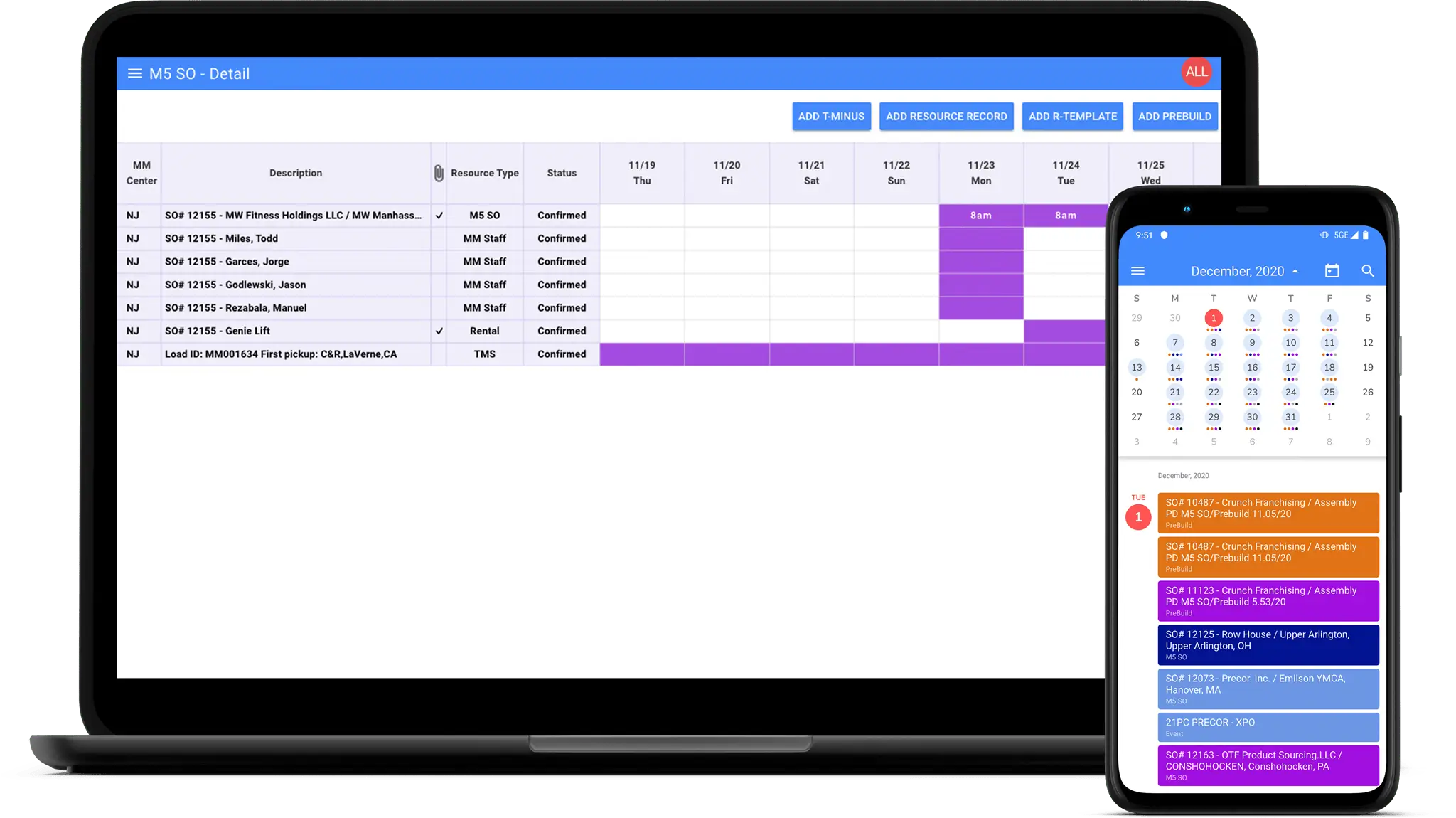
A real example shows how varied the building blocks can be. For Mass Movement, a logistics company whose assets were later acquired by J.B. Hunt, we built an inventory management system, a resource planner with iOS and Android apps, and a Windows service with Excel macros that extracted data from SQL tables into files for the company’s cloud-based field service management software. When one side of the connection is a CRM that is being built or replaced, we run the CRM development and the integration as a single project, so field names and sync rules are designed together from the start.
The Quiet Payoff of Integration Work
The cost of disconnected systems hides in manual re-entry, reports that arrive a week late, and decisions made on numbers that were already stale when someone exported them. Because the damage is gradual, most companies act only when a failed sync or a missed invoice turns it into an emergency.
Connected systems work quietly in the background. Sales sees payment status before the call, finance invoices on the day a deal closes, and leadership reads numbers that match across every dashboard. If your teams still rely on exports and copy-paste to keep tools aligned, contact us and we will map where your data gets stuck and which connections to fix first.
Frequently Asked Questions
What is enterprise system integration?
It is the practice of connecting a company’s business software, such as CRM, ERP, accounting, and marketing tools, so data moves between them automatically and stays consistent. The connections can be direct APIs, a central middleware layer, or a cloud integration platform, and most companies combine more than one.
What is the difference between EAI and iPaaS?
EAI is the broader discipline of connecting business applications, traditionally delivered through on-premise middleware that a company runs and maintains itself. iPaaS is a cloud delivery model for the same goal: the vendor hosts the platform, provides prebuilt connectors, and charges a subscription. Many companies run both, with iPaaS for SaaS tools and middleware for on-premise systems.
When should you choose middleware over point-to-point APIs?
Middleware makes sense once you connect more than three or four systems, apply complex business rules to data in transit, or need central monitoring of every flow. It also suits companies with critical on-premise software and high data volumes. For two or three tools with stable requirements, direct APIs are faster and cheaper.
How long does an enterprise integration project take?
In our experience, a single sync between two systems with documented APIs takes about 3 to 6 weeks, including testing and a parallel run. Connecting four or five systems through middleware or iPaaS usually takes 2 to 4 months. Programs that involve a legacy core without a modern API often run 6 months or longer, especially when modernization happens alongside.
How do you integrate a legacy system with modern SaaS?
The usual options are an API wrapper around the legacy system, change data capture at the database level, scheduled structured exports, or a middleware adapter. Starting with read-only flows lowers the risk, because the legacy system keeps working exactly as before while the SaaS side consumes its data. Write-back comes later, once the sync has proven reliable.
See how custom tools and SQL-to-cloud data pipelines streamlined Mass Movement's logistics ahead of its acquisition by J.B. Hunt