9,000+ Claude Code plugins exist as of April 2026. About 100 of them are production-ready. The rest will eat your context window for breakfast and give you nothing in return.
Gartner predicts that by 2028, 90% of enterprise software engineers will use AI code assistants, up from less than 14% in early 2024. The Stack Overflow 2025 Developer Survey shows we’re already most of the way there: 84% of developers are using or planning to use AI tools in their workflows, and 51% use them daily.
The ecosystem is massive. But more plugins don’t mean better results. In fact, the best Claude Code plugins 2026 are the ones that stay out of your way until you need them. We picked seven that do exactly that.
Skills vs. Plugins vs. MCP: What Actually Matters
Before we get into the list, a quick terminology reset. These three terms get thrown around like they’re the same thing. They’re not.
Claude Code skills are markdown instruction files. They teach Claude how to behave during a task. Think of them as a briefing doc you’d give a new team member. Claude plugins bundle those skills with supporting configs, hooks, and slash commands into a shareable package. Claude Code MCP servers are live connections to external systems like Figma, databases, or browsers via the MCP protocol. They’re powerful but heavy, as every MCP server loads its tool definitions into your context window at session start, whether you use them that session or not.
Here’s the rule of thumb: Claude Code CLI tools give you the most bang for the least context overhead. MCP servers earn their place only when no CLI alternative exists, like persistent connections, streaming APIs, real-time data feeds. For everything else, CLI-first is the smarter default.
7 Claude Code Plugins Worth Installing
Each plugin here follows three criteria: it solves a real workflow problem, it installs in under a minute, and it doesn’t bloat your context window. We also added a “skip this if” note for each, because the best plugin is the one you actually need.
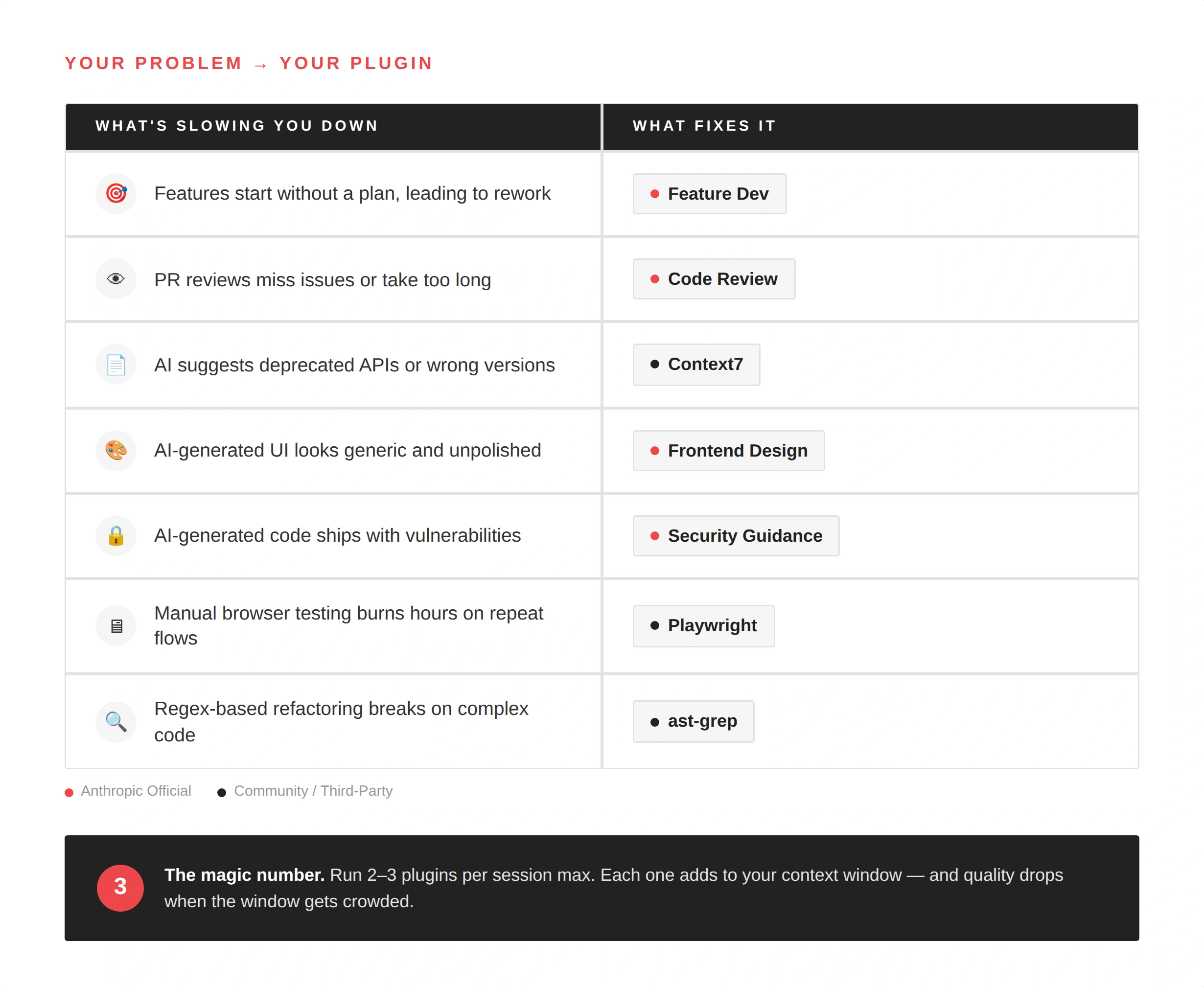
1. Feature Dev (Anthropic Official)
What it does: Replaces the “vague prompt → messy output” cycle with a structured 7-phase workflow. Discovery, codebase exploration, clarifying questions, architecture, implementation, quality review, summary. You walk through each phase before a single line of code gets written.
Why it matters: Unguided Claude Code attempts succeed about 33% of the time. Plan-first approaches push that number dramatically higher. Feature Dev enforces planning without you having to remember to plan.
Skip this if: you already run a tight spec process and just need Claude to execute.
2. Code Review (Anthropic Official)
What it does: Automated pull request review with confidence scoring. It catches missing tests, weak error handling, unclear types, and security gaps. Flags show up directly on the PR without interrupting your flow.
Why it matters: AI-powered code reviews are becoming standard practice, and for good reason. This plugin handles the first pass, which is the repetitive scanning that humans do poorly when they’re tired or rushing before a deadline. It doesn’t replace senior review, but it makes senior review faster. That’s the same principle behind professional code review services: you catch structural issues early so your senior engineers focus on architecture and logic, not missing semicolons.
Skip this if: your team already runs thorough manual reviews with a solid TypeScript review checklist (or equivalent for your stack).
3. Context7
What it does: Feeds Claude up-to-date documentation for your stack instead of relying on training data. When Claude suggests an API call, Context7 verifies it against current docs. No more deprecated methods, no more hallucinated function signatures.
Why it matters: Every developer who has used AI coding tools has hit this wall – Claude confidently writes code using an API that was deprecated three months ago. Context7 eliminates this class of errors entirely. It’s especially valuable when you work across multiple frameworks (React, Next.js, Supabase, Vercel CLI) where APIs change between minor versions.
Skip this if: you work exclusively with a stable, well-documented stack that hasn’t changed recently.
4. Frontend Design (Anthropic Official)
What it does: Produces distinctive UI output instead of what the community has started calling “AI slop” — the same generic card layouts and muted blue palettes you’ve seen a thousand times. Bold typography, real color palettes, creative layouts.
Why it matters: If you’re prototyping a frontend for a client demo or an investor pitch, generic output kills credibility. This plugin pushes Claude toward production-grade visual decisions. It won’t replace a dedicated designer, but it bridges the gap between “I need something to show tomorrow” and “this looks like every other AI-generated landing page.”
Skip this if: you have a design system and a dedicated UI/UX team handling the visual layer.
5. Security Guidance (Anthropic Official)
What it does: OWASP-based vulnerability detection that monitors nine security patterns — command injection, XSS, eval usage, dangerous HTML, pickle deserialization, and os.system calls. It hooks into PreToolUse, which means it catches issues before they land in your codebase, not after.
Why it matters: AI-augmented development introduces new security surface area. When Claude generates code fast, it can also generate vulnerabilities fast. Google addressed this directly in their internal AI coding guidelines, stressing that human oversight on security remains essential even as AI handles more of the implementation. Security Guidance automates that first line of defense.
This matters doubly for teams building AI-powered products where both the tooling and the product itself carry AI-related security considerations.
Skip this if: you already have a mature SAST/DAST pipeline integrated into your CI/CD.
6. Playwright
What it does: Browser automation and E2E testing from the terminal. Claude navigates your app, fills forms, clicks buttons, takes screenshots, and verifies UI flows. The show command opens a visual dashboard so you can watch Claude clicking through your app in real time.
Why it matters: Manual testing is the tax nobody wants to pay, especially on the twentieth iteration of the same checkout flow. Playwright lets Claude run those verification loops while you focus on the logic that actually matters. Combined with GitHub CLI for version control, you get a tight build-test-commit loop without leaving the terminal.
This is also a solid complement to professional QA testing services — automated browser tests handle the repetitive regression checks, freeing up human testers for exploratory and edge-case testing.
Skip this if: you already have Cypress or Selenium wired into your pipeline and don’t need another testing tool.
7. ast-grep
What it does: Structural code search and refactoring using AST (Abstract Syntax Tree) patterns. Instead of regex, which breaks on nested structures, multi-line expressions, and anything involving quotes, ast-grep understands your code’s actual structure.
Why it matters: This is the single biggest capability gap for AI coding assistants. Claude Code defaults to regex-based search and replace, which works fine for simple substitutions. But when you need to find every function that takes a callback and convert it to async/await, regex is a hand saw and ast-grep is a power tool. It supports JavaScript, TypeScript, Python, Rust, Go, and more.
Skip this if: you work in a single small codebase where grep is enough.
How to Create a Plugin When None Exists
Sometimes the plugin you need doesn’t exist yet. The good news: you can create plugin packages in minutes, not days.
A Claude Code plugin is fundamentally just a folder with a SKILL.md file. The structure is straightforward:
- Create a directory: .claude/plugins/your-plugin/
- Write a SKILL.md file with your instruction set — keep it under 2,000 tokens (Anthropic’s official guidance confirms shorter skills perform better)
- Add hooks or slash commands if you need automation triggers.
Where this gets interesting is in team environments. When you build software for clients, recurring patterns emerge, including deployment checklists, review protocols, linting rules specific to a client’s stack. Packaging those patterns as Claude Code extensions means every engineer on the project follows the same playbook without memorizing it. Commit the plugin to version control, and new team members inherit months of accumulated project knowledge on day one.
What Not to Do
Three mistakes that will cost you more time than they save:
Don’t install 15 plugins at once. Every plugin adds to your context window baseline. A fresh Claude Code session already consumes around 20,000 tokens before you type anything. Stack ten MCP servers on top of that, and you’ll hit quality degradation before you get any real work done. Three focused plugins beat ten that fight for attention.
Don’t skip reading the source. Community plugins are unvetted text files. If you wouldn’t run a random shell script from GitHub without reading it, don’t blindly install a plugin that hooks into every file edit. Audit hooks especially, as they fire automatically on events like file writes and commits.
Don’t reach for a plugin when CLAUDE.md handles it. If the behavior you want is “follow our naming conventions” or “always run tests before committing,” that’s a five-line CLAUDE.md entry. Not everything needs to be a plugin.
Wrapping Up
The Claude Code plugin ecosystem is growing faster than anyone can track. But more options don’t mean better outcomes. Start with two or three plugins that match your current workflow, give them a week, and keep what sticks.
The philosophy is simple: CLI-first, minimal context overhead, install only what you’ll use this week. The tools we listed here follow that principle. They solve real problems without adding noise.
Need a team that already has this dialed in? Contact us — we’re two clicks away.
FAQ
What's the difference between Claude Code skills and plugins?
Skills are markdown instruction files that teach Claude how to behave during a specific task. Plugins bundle skills with supporting configs, hooks, and slash commands into a shareable package. Think of skills as a recipe and plugins as the full kitchen toolkit.
How many Claude Code plugins should I install?
Experienced users consistently recommend two to three active plugins maximum. Each plugin adds to your context window baseline, and overloading it degrades Claude’s output quality. Start small, evaluate weekly, and remove anything you haven’t used.
Can I build my own Claude Code plugin?
Yes. A plugin is a folder with a SKILL.md file and optional hooks or commands. Anthropic recommends keeping skill files under 2,000 tokens for best performance. You can commit plugins to version control and share them across your team.
See how a software audit helped future-proof a backend API, increasing its maintainability by 80%.