In March 2026, Georgia Tech researchers traced 35 new CVEs directly to AI-generated code. That single month produced more vulnerabilities than all of 2025 combined, and the same team estimates the real number across open source is five to ten times higher.
If your product was built with Lovable, Bolt, Cursor, or Replit, that data should change what “ready to launch” means for you. The code runs. Users sign up. The demo looks great. None of that tells you whether a stranger with twenty minutes can read your entire user table. The vibe coding security risks inside those codebases cluster in the same predictable places, regardless of which tool generated the code.
A vibe code audit is a structured review of AI-generated code that surfaces the issues production traffic will find first. Audit work like vibe code cleanup consistently lifts maintainability by 80–90%, and the same ten findings are usually what’s holding it down.
Why AI-Generated Code Breaks in Production
Speed is the entire pitch of vibe coding. Tools like Cursor and Lovable optimize for working output, not safe output. Those are not the same thing, and the gap is exactly what a proper vibe coding code review is meant to close.
The Cloud Security Alliance reviewed Veracode research across more than 100 large language models and found that 45% of AI-generated code samples introduce OWASP Top 10 vulnerabilities. The pass rate hasn’t meaningfully improved from 2025 into 2026 despite vendor claims to the contrary.
A working demo passes the eye test. It doesn’t test whether your auth flow leaks, whether your database returns other users’ rows, or whether a hallucinated dependency just landed in production. If you’re doing software development for startups at speed, you need to audit AI-generated code with the same rigor you’d apply to a junior engineer’s pull request. The same risk extends into shadow AI detection territory: code shipped through engineering teams where nobody tracks how much of it the AI wrote.
The 10 Critical Checks Before You Launch
These ten checks come from real audit work, ordered by how often they appear and how much damage they cause. Each one belongs in any thorough vibe code app review before launch. Some you can verify in five minutes with a quick scan. Others need a senior engineer reading your code by hand. Run them in this order to catch what takes down most vibe-coded apps before paying users find it for you.
1. Exposed Secrets and API Keys
The most common AI-generated flaw, by a wide margin. AI tools regularly embed credentials in client-side bundles or commit them to public repositories. Once a key is out, it’s out. Rotating costs money, time, and customer trust.
A vibe-coded social platform called Moltbook leaked 1.5 million authentication tokens within three days of launch, as Infosecurity Magazine reported. The founder later said publicly that he hadn’t written a single line of code. He hadn’t reviewed any either.
Check three places: client-side JavaScript bundles, environment files committed to Git, and CI/CD configuration. Run a secret scanner like TruffleHog or GitGuardian on your entire commit history, not just the current branch. If you find anything, rotate the keys first and clean Git history second.
2. Server-Side Authentication
AI tools love a clean component pattern. They’ll add an isAdmin check on the frontend and call it done. From a user experience perspective, the dashboard hides correctly. From a security perspective, anyone with browser DevTools can flip the flag and walk in.
Every protected endpoint needs to verify identity on the server, with a token validated against your auth provider on every request. Not the cookie. Not the local-storage value. The signed token, checked server-side.
Run one quick test: log out, copy a request to a protected endpoint, replay it with the auth header removed. If the data comes back, that endpoint is open. Repeat for every privileged route.
3. Row-Level Security and Authorization (IDOR)
Authentication tells the server who you are. Authorization tells the server what you’re allowed to see. AI tools handle the first part reasonably well. They almost never handle the second.
The classic break is an Insecure Direct Object Reference. User A logs in normally, changes a numeric ID in the URL, and reads User B’s data. With Supabase, this usually means row-level security is disabled or only partially configured at the database layer.
Test the way an attacker would. Log in as a test user, then try to read, update, or delete a resource owned by a different user. If any of those calls succeed, you have an authorization bug. Fix it at the database level, not just the API.
4. Input Validation and Sanitization
Every form field, query parameter, and JSON body coming into your API is hostile until proven otherwise. AI tools trust input by default, which opens the door to SQL injection, cross-site scripting, and server-side request forgery.
Cloud Security Alliance research puts the OWASP Top 10 vulnerability rate in AI-generated code at 45%, with Cross-Site Scripting and SQL injection cited as the most common patterns.
Validate input at the boundary, before it touches your business logic. Use parameterized queries for every database call with no exceptions. Sanitize anything that will be rendered as HTML. For file uploads, check type, size, and content. The functions are short and well-documented in every modern framework.
5. Rate Limiting on Critical Endpoints
Two endpoint types fail in opposite directions when they aren’t rate-limited. Authentication endpoints get brute-forced. External API endpoints turn into a bill you don’t want to see on Monday.
The same logic applies to anything that triggers an outbound call: SMS sends, email blasts, LLM requests, payment confirmations. One bored attacker with a script can drain your monthly budget in an hour.
Set sane defaults on three layers: login attempts per IP per minute, API calls per authenticated user per minute, and outbound expensive operations per user per hour. Most frameworks ship rate-limiting middleware out of the box. AI rarely adds it unprompted, so check explicitly, and check before payments go live.
6. Security Headers and CORS
Browser-level security headers do quiet, important work. They sit between your server and the user’s browser, preventing whole categories of attack you’d otherwise have to fight in application code.
At minimum, your responses should include these:
- Content-Security-Policy (blocks injected scripts)
- Strict-Transport-Security (forces HTTPS)
- X-Frame-Options (stops clickjacking)
- X-Content-Type-Options (prevents MIME sniffing)
- Referrer-Policy (controls what URLs you leak)
CORS deserves its own check. AI-generated configs often start as Access-Control-Allow-Origin: *, which means any website on the internet can make authenticated requests to your API. Lock CORS down to the exact domains you serve, and reject everything else.
7. Webhook Signature Verification
Payment providers, calendar services, and most modern SaaS platforms send updates to your app via webhooks. Each one is essentially a public endpoint that anyone on the internet can call. The signature is what tells you the call actually came from Stripe, not from a random script that found your endpoint.
AI-generated webhook handlers frequently skip the signature check entirely. The integration works in testing because no one is forging calls. It fails the first time a payment goes wrong, or worse, an attacker fires a fake “subscription paid” event and unlocks premium features for free.
For every webhook receiver, verify the signature with the provider’s library, use idempotency keys to deduplicate retries, and log every payload for debugging.
8. Soft Deletes and GDPR-Ready Deletion Flows
When a user clicks “delete account,” what actually happens to their data? In most vibe-coded apps, the row gets removed from one table while the rest of the system carries on referencing the missing record. Cue mysterious crashes in production a week later.
Two problems sit underneath this. The first is engineering: you need soft deletes (a deleted_at column rather than a DELETE statement) so your app stays consistent. The second is legal. GDPR Article 17 gives EU users a right to erasure, and you have to honor it across logs, backups, and analytics, not just the primary database.
Map every place user data lives, then build a deletion flow that touches all of them. Test it before any user can hit the button.
9. Dependency Vulnerabilities
AI tools suggest packages confidently, including ones that don’t exist. Researchers call this “slopsquatting”: attackers register the hallucinated package names on npm or PyPI and ship malware to anyone who installs them. Even when the package exists, AI tends to suggest old versions with known CVEs. Your package.json ends up looking like a museum of last year’s vulnerabilities.
Run a dependency audit on your full lockfile: npm audit for Node, pip-audit for Python, or Snyk for either. Add a CI step that fails the build on high-severity findings. Re-run the scan weekly, because new CVEs land on existing packages all the time.
10. Production Config Hardening
The last twenty percent of pre-launch problems live in your deployment configuration. The usual offenders are debug mode that still prints stack traces, source maps served alongside production JavaScript, default admin credentials that nobody changed, and CI/CD pipelines that leak secrets into build logs.
A quick checklist for deployment config:
- Debug and verbose error modes turned off.
- Source maps not served to the browser.
- All default credentials replaced.
- Build logs scrubbed of secrets.
- TLS 1.3 enforced everywhere.
- Error responses generic, with details written only to internal logs.
This list reads as obvious in print. It also catches roughly half of the embarrassing post-launch incidents that end up on Hacker News. Run it before every deploy, not just before launch.
Vibe Code Review Best Practices: What to Fix First
Ten checks is a lot to absorb in one sitting. The damage profile is uneven though, and a handful of issues cause most of the breaches that make the news. You can knock those out first.
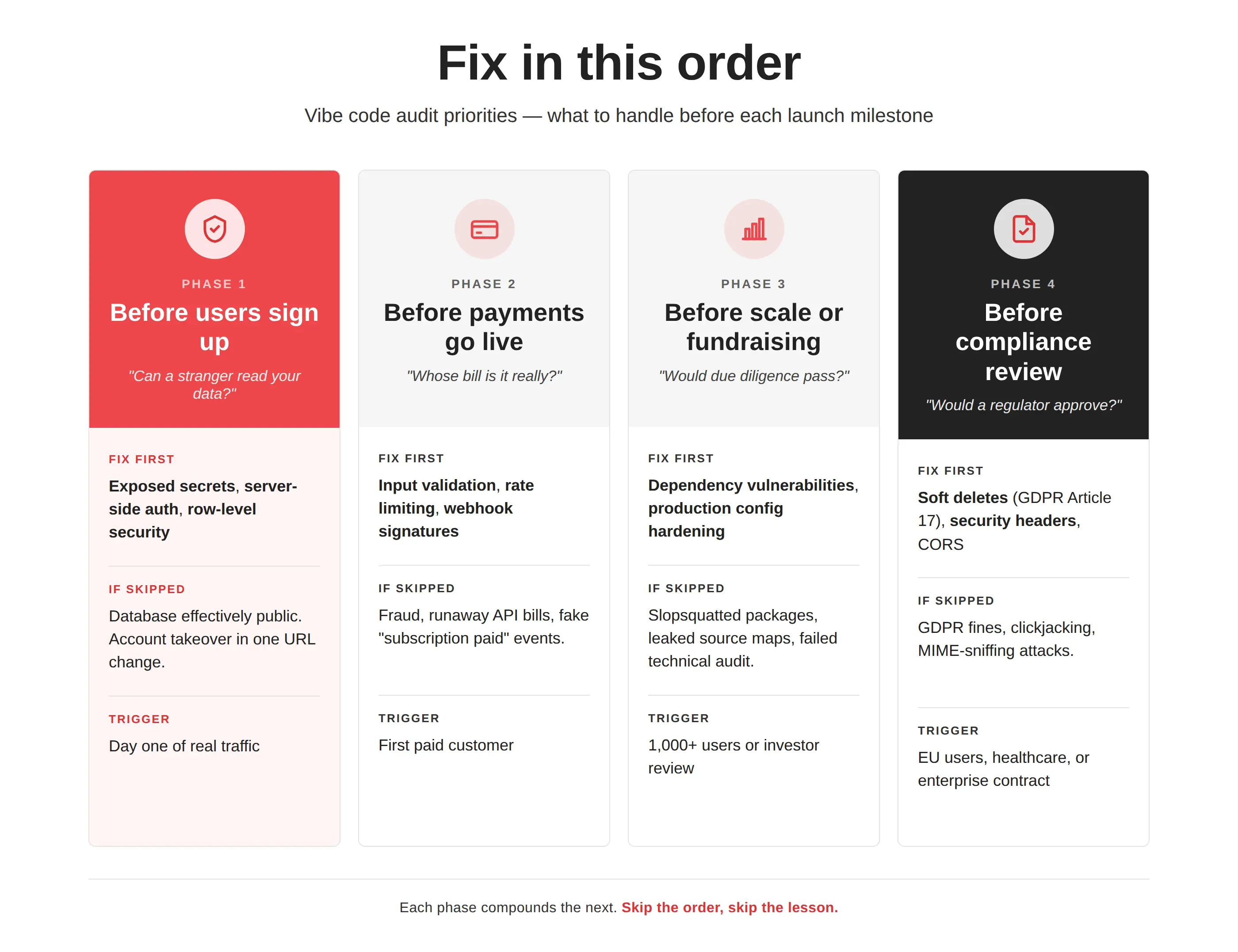
Fix in this order:
- Before any production user signs up: exposed secrets (#1), server-side authentication (#2), row-level security (#3). These three are behind most of 2026’s headline breaches. Three of these checks are also the three our team spends most of an audit on, because the failure modes don’t look like bugs.
- Before payments go live: input validation (#4), rate limiting (#5), webhook signatures (#7). Anything touching money or external services depends on all three.
- Before scale or fundraising: dependency vulnerabilities (#9) and production config (#10). Investors and acquirers will look at both during technical due diligence.
- Before serving EU or US healthcare users: soft deletes (#8) and security headers (#6).
AI tools make code fast. Production needs slow, deliberate review. For teams that prefer a second set of eyes, an external code review and a full vibe code review can cover what this checklist can’t. If that’s you, we’re two clicks away, and we’ll help.
FAQ
How long does a vibe code audit take?
For a small project with one developer, a single repo, and a narrow feature set, a structured initial assessment takes one to two weeks. Larger or more complex codebases run longer, often three to four weeks for a full review. The audit itself is the fast part; remediation, especially on authorization and database issues, is where most of the calendar goes. A finished audit gives you a prioritized list, severity ratings, and a remediation plan you can hand to a developer.
How is a vibe code audit different from a penetration test?
An audit reads your source code looking for structural and security issues. A pen test attacks the running application from the outside, looking for what an actual attacker would find. Most vibe-coded apps need the audit first, because the issues are baked into the code and a pen test won’t show you everything that’s wrong. Run the pen test after remediation, not before.
Can I audit my AI-generated code myself?
The ten checks above will catch the most damaging issues, and you can run most of them with free tools. The context-dependent issues are harder. Business logic flaws, architectural decoupling, and compliance mapping need a senior engineer who’s seen the same patterns across many codebases. Most teams land on a hybrid model where AI-powered code reviews handle the first pass and a senior engineer handles the last.
What's the most common issue found in vibe-coded apps?
Disabled row-level security at the database layer. Independent audit data shows it in most Lovable-built apps, and the pattern repeats across Supabase-backed Bolt and Cursor projects. Combined with exposed API keys, it means any authenticated user can read any other user’s data with a few keystrokes. It sits at the top of nearly every audit report worth its name, because the fix is straightforward and the risk is severe.
You just read the 10 checks. See what they look like in a real audit: 80+ findings on a real estate mobile app before its launch.