Your users have started asking where the AI is. A competitor shipped a smart search box, your sales team keeps fielding questions about it, and someone on the board wants an AI roadmap before the next quarterly review. Your product runs on Node.js, it works, and it pays the bills. The last thing you want is to freeze the roadmap for a rewrite.
Here is the direct answer. You can add AI features to a Node.js app without rebuilding it. Most features that move retention and revenue attach as a thin layer that reads the data you already store, calls a model over an API, and streams the result back through the Express or Fastify routes you already run. What decides success is rarely the model. It is how you handle streaming, the event loop, and cost inside Node.
An MIT NANDA study found that 95% of enterprise generative AI pilots delivered no measurable profit impact, and the cause traced back to weak integration with real workflows rather than to the model itself. This guide is the Node.js specific version of getting that integration right.
Where to Add AI Features in a Node.js App
Not every AI feature carries the same risk, and teams often burn a quarter starting with the hardest one. The four categories below deliver value as add-ons and map cleanly to what a typical Node.js backend already stores and does. Here is how they compare before we go deeper.
Semantic search
Finds records by meaning, not exact keywords
A vector store and an embeddings call
Low to medium
In-app assistant
Answers questions and acts inside your UI
Streaming responses and function calling
Medium
Content generation
Drafts replies, summaries, and descriptions
A job queue for longer generations
Low
Classification and routing
Tags, prioritizes, and routes incoming records
A model call on write or webhook events
Low
If you are unsure where to start, semantic search and classification are the safest first bets. Both read data you already hold and write a result back without changing any flow your users touch, which keeps the blast radius small. We cover the same integration-first thinking for a broader stack in our guide to adding AI to an existing SaaS product.
The Node.js Gotchas That Break AI Features
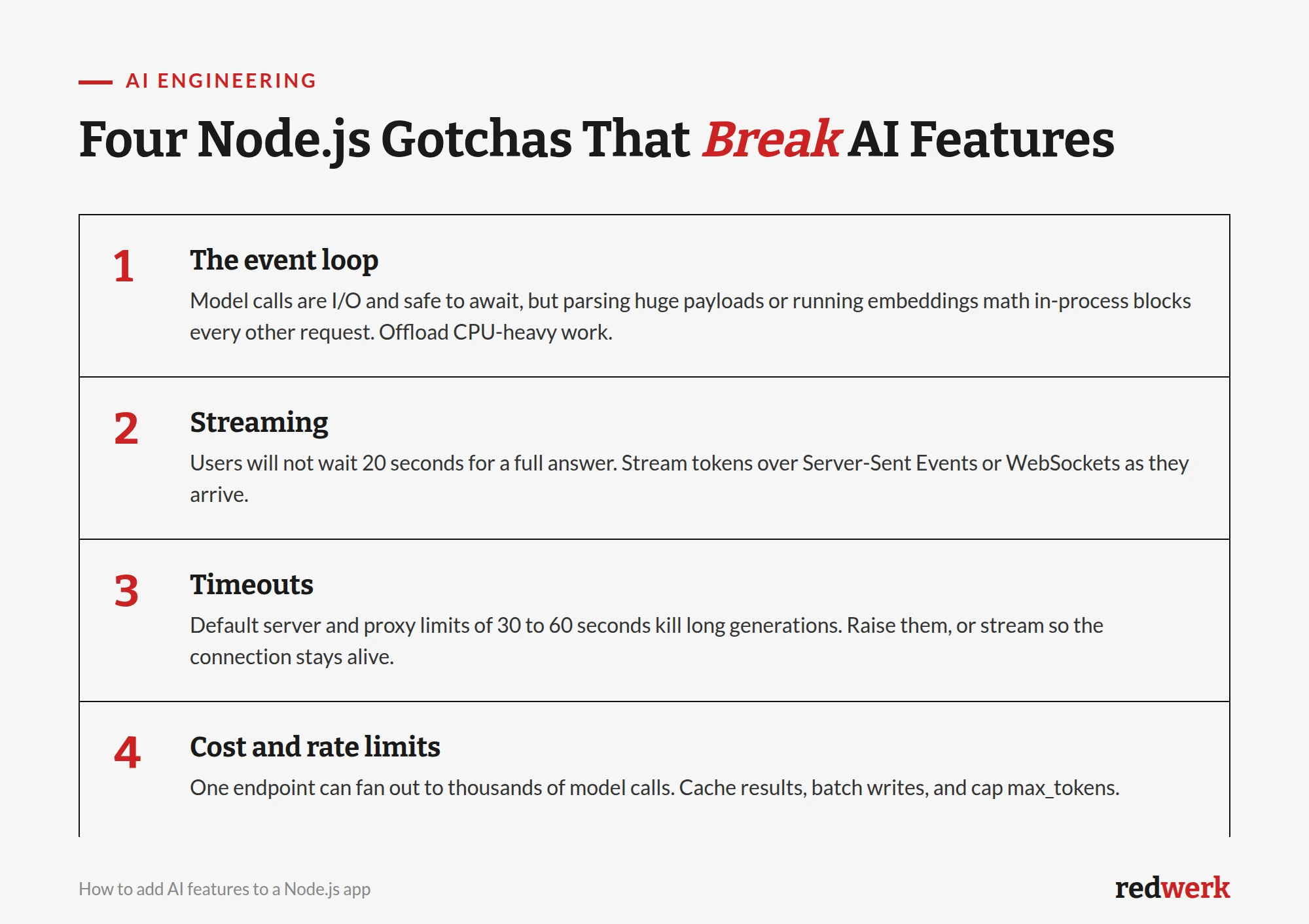
The model is the easy part. The failures we get called in to fix on Node.js projects are almost always in the plumbing around it. Four issues break AI features far more often than a wrong prompt.
The event loop. A model call is I/O, so awaiting it is fine and does not block Node. The trap is the work around it: parsing a large JSON payload, running embedding math, or resizing an image in the same process stalls every other request. Move CPU-heavy work to a worker thread or a separate service.
Streaming. A full answer can take 10 to 30 seconds to generate. Users will not stare at a spinner that long. Stream tokens to the browser over Server-Sent Events or WebSockets so the response appears as it is written, the way ChatGPT does.
Timeouts. Default timeouts on your Node server, your reverse proxy, and your load balancer usually sit at 30 to 60 seconds. A long generation trips them and the user sees a dropped connection. Raise the limits on the AI route, or stream so the connection keeps sending data and stays alive.
Cost and rate limits. One innocent-looking endpoint can fan out to thousands of model calls under real traffic, and the bill or the provider rate limit arrives fast. Cache repeated results, batch background work, and cap max_tokens on every call.
A Working Example: Streaming an AI Response in Node.js
A copilot-style feature is the one most teams want, so here is the piece that trips people up: streaming a model response through Node without blocking anything. The example uses Express and the official Anthropic SDK, but the shape is identical with the OpenAI SDK or a raw fetch to any provider. First, install the SDK and initialize a client that reads your key from the environment.
import Anthropic from "@anthropic-ai/sdk";

// Reads ANTHROPIC_API_KEY from the environment. Never hardcode the key.
const client = new Anthropic();
Then expose one route that opens a Server-Sent Events stream and forwards each token to the browser as it arrives. Note that the model call is awaited inside an async handler, so it never blocks the event loop, and the connection stays open while tokens flow, which sidesteps the timeout problem above.
import express from "express";

const app = express();
app.use(express.json());

app.post("/api/assistant", async (req, res) => {
  const { question } = req.body;

  // Server-Sent Events: push tokens to the browser as they are generated.
  res.setHeader("Content-Type", "text/event-stream");
  res.setHeader("Cache-Control", "no-cache");
  res.setHeader("Connection", "keep-alive");

  try {
    const stream = client.messages.stream({
      model: "claude-opus-4-8",
      max_tokens: 1024,
      messages: [{ role: "user", content: question }],
    });

    for await (const event of stream) {
      if (
        event.type === "content_block_delta" &&
        event.delta.type === "text_delta"
      ) {
        res.write(`data: ${JSON.stringify(event.delta.text)}nn`);
      }
    }
    res.write("data: [DONE]nn");
  } catch (err) {
    res.write(`data: ${JSON.stringify({ error: "generation failed" })}nn`);
  } finally {
    res.end();
  }
});

app.listen(3000);
That is the whole pattern. The browser reads the stream with EventSource or a fetch reader and appends each chunk to the UI. If that client is a native iOS app rather than a browser, the same backend serves it unchanged, and our guide to adding AI features to a Swift app covers streaming it into a SwiftUI view. Everything else, your database, auth, and business logic, stays exactly as it is. Before you ship it, put the same care into this route that you would into any other production endpoint: validate the input, rate-limit per user, and log token usage. A quick Node.js code review checklist catches the security gaps that AI routes tend to introduce.
Managed API or Self-Hosted Model?
You have two ways to run the model, and the choice drives cost, latency, and effort more than any other decision here.
A managed API (Anthropic, OpenAI, Google, and others) is the right default for almost every mid-market product. You send a request and get a response, there is no infrastructure to run, and you get frontier-quality models on day one. The trade-offs are per-token cost at scale and sending data to a third party, which matters for regulated data.
A self-hosted open model (running Llama, Mistral, or similar on your own GPUs) makes sense when you have strict data-residency rules, very high and steady volume where per-token pricing hurts, or a narrow task a smaller fine-tuned model handles well. The cost moves from per-token fees to GPU infrastructure and the engineering time to run it, so it rarely pays off before real scale.
Start with a managed API, measure real usage, and only move to self-hosting when the numbers justify it. Building for a self-hosted model you do not yet need is the most common way to blow the timeline.
What It Costs and How Long It Takes
For a scoped, well-defined feature on data that is already clean and accessible, a first AI feature in a Node.js app typically ships in four to eight weeks. Semantic search and classification land at the fast end. A full in-app assistant with function calling and a polished streaming UI lands at the slow end because it changes the interface, not just the backend.
The timeline depends far more on data readiness than on the model. If your data is spread across services, poorly documented, or full of gaps, most of the work is getting clean, retrievable context to the model, not wiring up the API. Budget for that discovery up front. Running costs are usage-based: a managed API feature often runs from tens to a few hundred dollars a month at mid-market volume, which is why capping max_tokens and caching matter from day one.
When Adding AI Is the Wrong Call
Adding AI is not always the right move, and saying so up front saves everyone a wasted quarter.
Skip it, for now, if a deterministic rule or a normal search index already solves the problem. AI is probabilistic and costs money per call, so using it where a WHERE clause would do adds expense and a new failure mode for no gain. Skip it if your data is too thin or too messy to give the model useful context, because a feature built on bad data produces confident, wrong answers that erode trust faster than having no feature at all. And skip it if the only driver is a board slide rather than a user problem you can name. The AI pilots that fail are almost always the ones with no specific job to do.
How Redwerk Adds AI to Node.js Apps
Redwerk builds and rescues Node.js products, and AI integration is one of the areas we get pulled into most often, usually to add a feature cleanly to a product that already has paying users. Our edge is tech-match: we staff engineers who already know Node.js and have shipped model integrations, so there is no ramp-up spent learning your stack on your budget. We work integration-first, keep the change reversible, and keep you in the loop the whole way, which is the single thing our clients call out most.
If you would rather have a senior team that already knows this stack, here is how Redwerk approaches AI development and how our web development team ships it on Node.js without pausing your roadmap.
Takeaways
- You can add AI features to a Node.js app as a thin layer, without a rewrite.
- Start with semantic search or classification: low risk, reads data you already have.
- The hard parts are Node-specific: the event loop, streaming, timeouts, and cost, not the model.
- Stream responses over Server-Sent Events so long generations do not trip timeouts or frustrate users.
- Default to a managed API; self-host only when data rules or scale clearly justify it.
- Expect four to eight weeks for a first scoped feature, driven mostly by data readiness.
FAQ
Do I need to rewrite my Node.js app to add AI features?
No. Most AI features attach as a separate layer that connects to your existing product through your current API. Your database, business logic, and interface stay as they are. The layer reads data, calls a model, and writes results back, so you can also remove it later without touching the core.
Which AI feature should I add to a Node.js app first?
Semantic search or classification. Both read data you already store and write a result back without changing any flow the user interacts with, which makes them the lowest-effort and lowest-risk entry points. They also surface data-quality problems early, before a more visible feature can be derailed by them.
How do I stream AI responses in Node.js without blocking the event loop?
Await the model call inside an async route and forward each token to the client over Server-Sent Events or WebSockets as it arrives. Because the call is I/O, awaiting it does not block the event loop. Keep CPU-heavy work such as embedding math or large payload parsing off the main thread using a worker thread or a separate service.
How much does it cost to add AI features to a Node.js app?
Build cost tracks the four-to-eight-week timeline for a first scoped feature, driven mostly by how clean and accessible your data is. Running cost is usage-based with a managed API, often tens to a few hundred dollars a month at mid-market volume. Capping max_tokens and caching repeated results keeps that predictable.
See how Redwerk took over core development of an AI optimization platform and carried it through to a successful product launch