Claude Code has become a serious productivity lever for engineering teams. The gains in the first weeks are usually obvious. What is less obvious is what happens once your team starts using it for longer, more ambitious work: multi-file refactors, large audits, end-to-end feature builds. At that scale, output quality and cost stop tracking the way they did at the start, and the reasons are not always easy to see from a leadership view.
The answer is almost never the model. It is the architecture around the model. Teams that get 5x to 10x out of Claude Code do not run a different version of Claude. They run the same version with Claude subagents wired in, which keeps long sessions sharp instead of letting them decay. This piece is for the people deciding where to invest engineering time: it walks through the five bottlenecks that quietly cap your team’s throughput, the subagent patterns that fix each one, and when to graduate to Claude Code agent teams. By the end, you will know what to ask your engineering lead and how to spot whether your current setup is leaving real money on the table.
What Claude Subagents Actually Are
A Claude subagent is an isolated Claude Code instance with its own ~200K context window, its own system prompt, its own tool allowlist, and its own permissions. The main session delegates a task to it. The subagent does the work in isolation, then returns only a summary. Everything noisy that happened inside the subagent stays inside the subagent.
The real value here is not parallelism, although that helps. It is isolation. When a subagent reads forty files to find a pattern, the main session never sees those forty files. It sees one paragraph: “found the pattern, it lives here, looks like this.” That keeps the main thread sharp across a long session.
Three flavors are worth knowing. Built-in subagents like Explore and Code ship with Claude Code and run automatically. Custom subagents live in your .claude/agents/ folder and let you define specialists for security, testing, or documentation. And if one session genuinely cannot hold the work, Claude Code agent teams let you coordinate multiple sessions with messaging between them.
Claude Code sits inside a wider landscape of multi-agent AI frameworks like LangChain, OpenAI’s Agents SDK, and Google ADK, each with different tradeoffs on orchestration, memory, and tool access. Subagents are Anthropic’s answer to the same coordination problem those frameworks try to solve, built directly into the Claude Code runtime instead of bolted on as a separate layer.
The five bottlenecks that break long Claude Code workflows
Engineering leads usually describe Claude Code slowdowns in vague terms: “the model gets worse”, “it forgets things”, “sessions get expensive”. These are real observations but they are not random. Each one maps to a specific architectural cause inside how a single-context session handles work over time, and each one has a subagent pattern that resolves it without needing a different model or a different tool.
The five patterns below cover the majority of what slows long sessions down. Knowing which one is hitting your team is the difference between throwing more tokens at the problem and actually fixing the workflow.
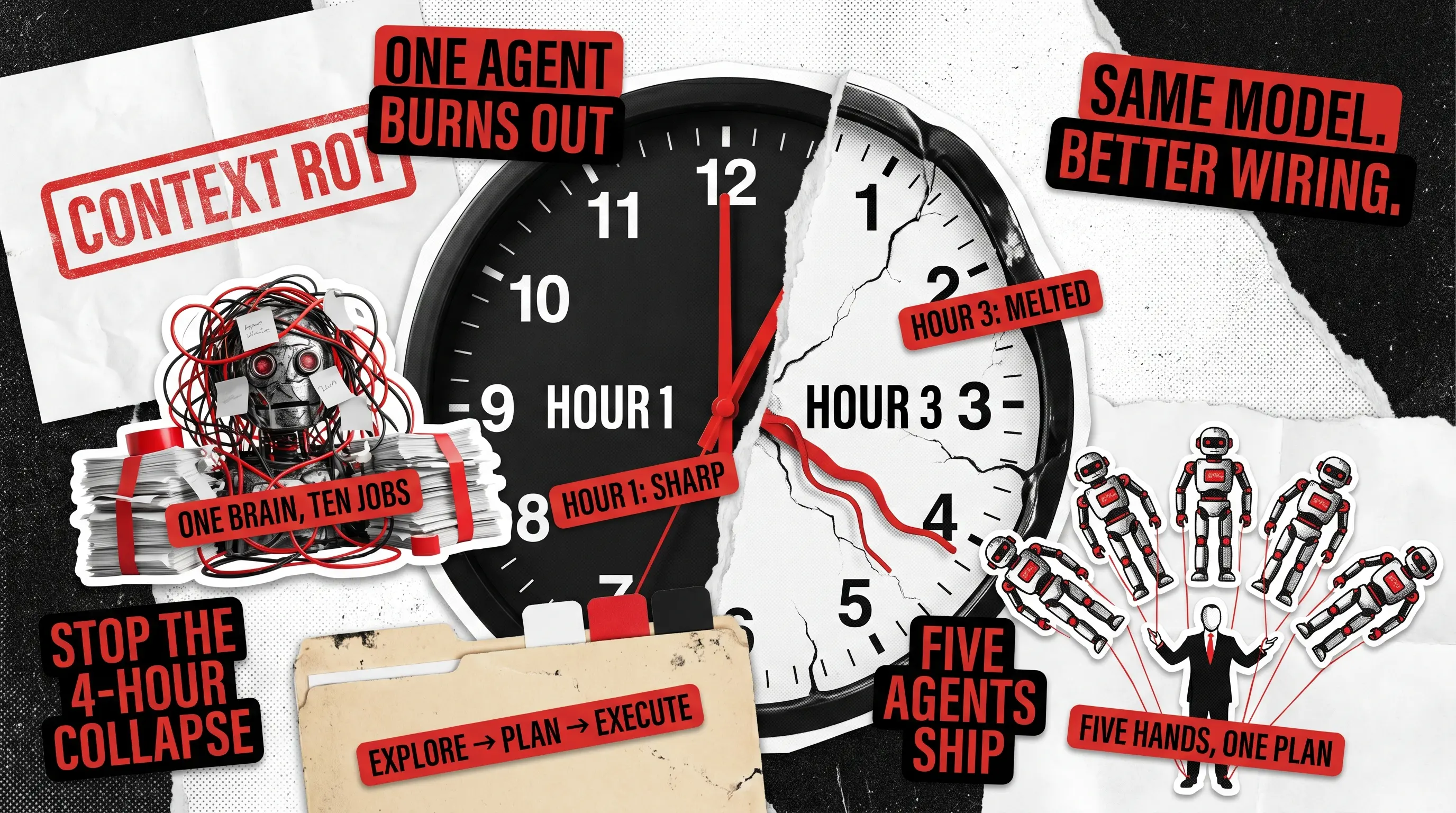
Context rot is the slow decline in output quality as the context window fills up. It kicks in well before the hard token limit. The more context the model is holding, the less weight your original instructions carry. By hour three, the architectural plan you laid out at the start is buried under tool outputs, file contents, and prior reasoning, and the model effectively starts ignoring it.
The fix is to delegate noisy work to a subagent. Anything that will read more than five files, parse large diffs, or chew through logs goes to an Explore subagent. The main session never sees the raw output. It sees the findings.
You will know this is working when your hour-three quality matches your hour-one quality.

Sequential Drag on Independent Work
When a long workstream runs everything through one main session, independent pieces of work end up waiting on each other for no good reason. Security review waits on tests, tests wait on docs, docs wait on the refactor. The work itself was never sequential. The architecture made it sequential.
The split-and-merge pattern dissolves this. Independent workstreams get fanned out across parallel subagents and the results come back to one place. Where teams get it wrong is by dispatching subagents in generic terms, which produces overlapping work, edits to the same files, and a merge mess at the end. The teams that do this well give each subagent a named role, a defined deliverable, and clear boundaries on what it can touch. That precision is what turns parallel execution into actual throughput instead of three agents stepping on each other.
Cross-Domain Contamination
Context rot is about what fades over time. Cross-domain contamination is about what competes in the moment. When one session is asked to hold backend rules, frontend rules, and SDK conventions simultaneously, those rule-sets interfere with each other. The model is not running out of room. It is being pulled in three directions at once.
The visible failure: backend patterns leak into React components, or frontend conventions show up in data transfer objects. The code looks plausible at a glance but violates the conventions you set for each layer. This is the result of asking one context to be expert in too many things at the same time.
The fix is one subagent per domain. The backend subagent loads only backend instructions. The frontend subagent loads only component patterns. The orchestrator coordinates between them but never tries to hold all the rules itself. The same principle underpins clean architecture in software development, and it works for the same reason: separation of concerns prevents drift.
The Four-Hour Collapse
The four-hour collapse happens when one of the workflow steps fails and the whole pipeline stalls, or when the session runs out of room halfway through and the accumulated state is lost. Most single-context workflows are fragile this way because nothing is saved between steps.
The fix is a structured Explore, Plan, Execute pipeline. Each phase is a separate subagent invocation with a clean handoff to the next. The human review gate sits between Plan and Execute, where the cost of catching a mistake is lowest.
This matters at scale. Anthropic’s Dynamic Workflows release on May 28, 2026 showed Claude Code carrying out codebase migrations across hundreds of thousands of lines, with the existing test suite as the validation bar. One demo migrated a 750,000-line codebase in eleven days with a 99.8% test pass rate. Runs at that scale do not survive without structured handoffs between phases.
Orchestrator Overload
The other four bottlenecks sit at the worker level. Orchestrator overload is what happens at the coordinator level once the workers are humming. You have parallel subagents producing clean summaries, but the parent agent is now drowning in arrival traffic: ten summaries to read, ten sets of recommendations to reconcile, ten threads to keep coherent. Throughput stalls not because the workers are slow, but because nothing downstream can synthesize their output fast enough.
The fix is restraint at the top. The orchestrator should coordinate and nothing else. Parallelism should match actual task independence, not just available capacity. A read-only reviewer subagent at a 1:3 or 1:4 ratio helps keep quality high without adding to the merge load. Read-only matters because a reviewer with write access will start fixing issues itself, which creates conflicts with the implementer subagents. The same logic underpins how good code review works on a human team: the reviewer flags, the implementer fixes. Five parallel subagents is the practical ceiling for most teams inside one session.
Subagents vs. Agent Teams
Subagents are workers inside one Claude Code session. Claude Code agent teams coordinate across multiple sessions, each with its own context, communicating through messages between teammates. The choice between them is not academic. Get it wrong and you either burn money on agent teams when subagents would do, or you stretch subagents past where one session can hold the work.
Use subagents when you have one workstream that needs helpers underneath it. Parallel exploration, scoped delegation, isolated heavy-context reads. Use agent teams when the work itself splits across multiple longer-lived sessions, teammates need to talk to each other, or the total context exceeds what one session can realistically carry.
Scope
One session, scoped delegation
Multiple sessions coordinating
Communication
Return single summary to parent
Messaging between teammates
Best for
Parallel exploration, isolated reads
Multi-day work, distinct workstreams
Cost profile
Lighter
Heavier per teammate
Practical team size
Up to 10 parallel
3 to 5 teammates sweet spot
Most teams over-reach for agent teams. Start with subagents. Graduate to agent teams only when one session genuinely cannot coordinate the work.
The Mistakes That Turn Subagents into a Liability
Subagents are powerful, and they are also easy to misuse. Here are the patterns we see kill productivity instead of helping it:
- Over-delegating simple tasks. A one-file read does not need a subagent. The coordination overhead exceeds the saving. Use the main session for anything that fits comfortably inside it.
- Under-specifying outputs. Vague dispatch prompts produce vague summaries. Always state the deliverable shape: “return a markdown table with columns X, Y, Z” beats “summarize what you find”.
- Fake parallelism. Chaining subagents sequentially when the work has no real dependencies. If two subagents do not depend on each other, run them in parallel.
- Reviewers with write access. Defeats isolation. A reviewer that can edit will start fixing things, which creates merge conflicts and undoes the work your other subagents just did.
- Permission sprawl. Every additional tool widens your attack surface. Our writeup on AI agent governance covers why permission hygiene matters more than most teams realize, especially after the ClawBank incident reset what enterprise AI safety looks like.
Get these wrong and subagents will cost you more tokens, more time, and more rework than running everything in one session would have.
The Minimum Subagent Setup That Survives
If you are starting from scratch, here is the smallest production setup that survives a four-hour Claude Code session without quality collapse:
- One orchestrator on Opus. Coordinates only. Never implements.
- One Explore subagent on Haiku. Reads, summarizes, returns findings. Cheap and fast.
- One Code subagent on Sonnet. Implements against the Explore summary.
- One read-only Reviewer on Opus. Runs after each completed task. Output is structured findings, blocking and non-blocking.
- Graduate to agent teams only when one session genuinely cannot hold the work.
The model split matters because it controls cost. McKinsey‘s analysis of AI productivity gains in 2026 makes the point that AI’s value lies in reshaping how work is organized, not just running existing work faster. Subagents are exactly that kind of reshape. You stop treating Claude as one model doing everything and start treating it as an engineering team.
This setup matters most for teams shipping SaaS products at scale, where a four-hour Claude Code session is not unusual and the cost of context rot compounds across the release cycle.
Same Model, Better Architecture
The teams getting 10x out of Claude Code are not running a better model. They are running the same model with the right structure around it. The bottlenecks are predictable. The patterns are documented. The difference between teams that get an incremental boost from Claude and teams that change how they ship is whether they treat the tool as a single agent or an engineering team.
Build the architecture before you need it, not after the four-hour collapse. If you want help putting this together for a real workflow, contact us.
FAQ
What are Claude subagents?
Subagents are isolated Claude Code instances that the main session delegates tasks to. Each one has its own context window, its own tools, and its own instructions. The subagent does the work and returns a summary. The noisy middle stays inside the subagent, which keeps the main session focused.
Why does Claude Code get slower over time?
Context rot. As the context window fills up, the earliest instructions carry less weight, so by hour three the model is effectively ignoring the plan set at the start of the session. Subagents fix this by keeping noisy work out of the main session.
How many subagents can run in parallel?
Up to ten in parallel inside one Claude Code session, with five as the practical sweet spot before the coordinator becomes the bottleneck. Dynamic Workflows on Opus 4.8 raise the ceiling considerably for very large jobs.
When should I use Claude Code agent teams instead of subagents?
When the work itself splits across multiple longer-lived sessions, when teammates need to communicate, or when total context exceeds what one session can hold. For tightly scoped delegation inside one workstream, stick with subagents.
What is the biggest mistake teams make with subagents?
Over-delegation. Sending one-file reads or trivial tasks to a subagent costs more in coordination overhead than it saves. Use subagents for work that would otherwise pollute the main context.
See how Redwerk rebuilt Sentient Ascend's architecture to power the #1 AI-driven digital growth solution.